
Customization DS1142
COGS Allocation
Problem Definition:
ACME is a utility-scale manufacturer of tubular wind towers. They use GP Manufacturing in an actual cost environment. They record WIP Labor and actual material consumption. One MO produces one (and only one) serial-numbered tower.
Because inventory items are Actual Cost, GP does not track the individual costs (such as labor and material) that make up the finished good cost. When the item is sold and the Sale Invoice posts, GP credits Inventory for the total item cost, and debits COGS accordingly.
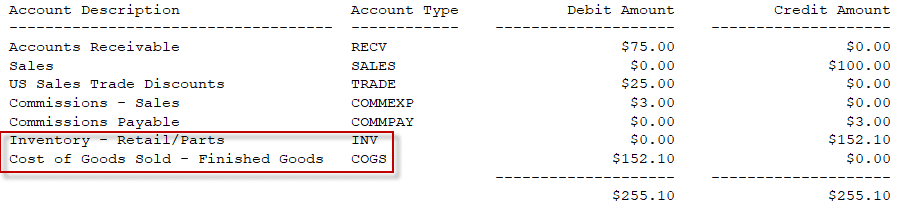
Note that the INV and COGS distributions are added at the moment of posting, because it is during posting when GP pulls inventory out of a specific FIFO layer, which allows it to determine the Actual Cost of the inventory being sold.
Because ACME serial numbers the finished goods, the Actual Cost is known as soon as a specific serial number is selected. Knowing the serial number also means that the Manufacturing Order which produced it can also be located, along with the actual material, labor and overhead costs that went in to the MO.
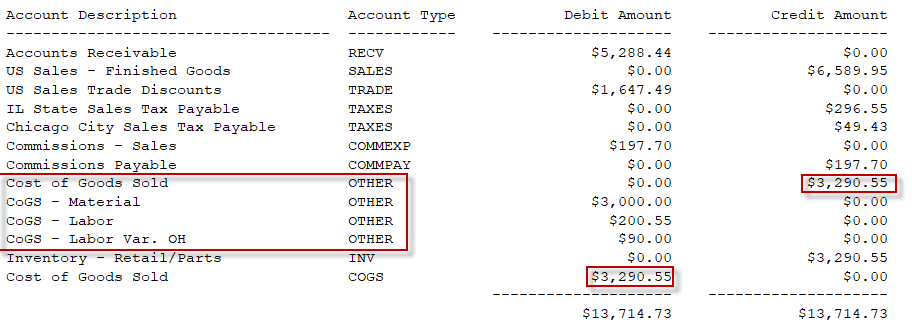
ACME would like to reallocate the COGS distribution to separate the total into the individual costs of Material, Labor and Labor Overhead.
Solution Overview:
During Sale Invoice Posting, additional posting accounts and distributions will be added to the transaction to reallocate the COGS amount into the individual cost buckets recorded on the Manufacturing Order.
Design Features:
Setup
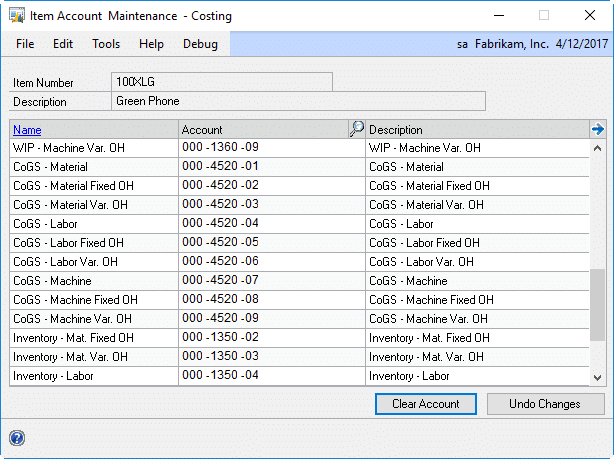
ACME will enter COGS accounts on the Item Account Maintenance- Costing window. The COGS Allocation described in the next section will only reallocate costs that have a matching GP Account in this window. For example, if only COGS-Material is present, the material cost from manufacturing will be subtracted from the IV COGS distribution and allocated to the COGS-Material account. Labor, Overhead, and any other costs will remain the in the IV COGS account.
COGS Allocation
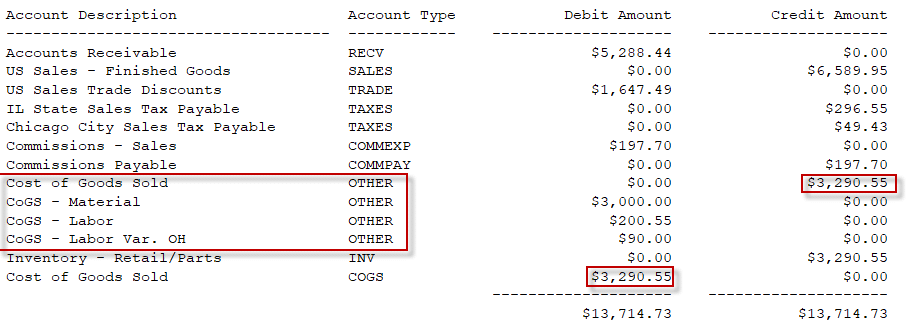
When a Sales Invoice posts, the new COGS Allocation routine will run to redistribute the SOP COGS amount into to detailed breakout recorded on the MO Receipt.
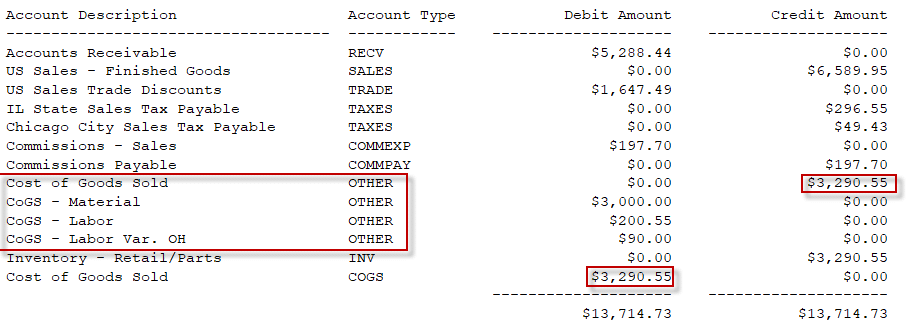
Note that in the screen capture above, the Account Type is OTHER because the Distributions window does not allow manually adding COGS distributions. When the COGS Allocation routine runs it will use the Account Type of COGS. Also, “SOP COGS” refers to the COGS account coming from either the Customer Maintenance or the Item Maintenance Accounts window.
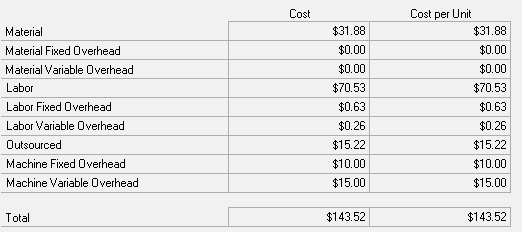
The MO Receipt tracks costs in up to nine cost buckets, as shown below.
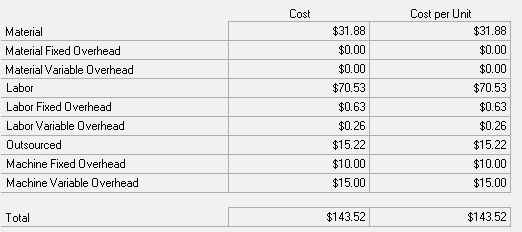
For each cost bucket on the MO Receipt where the dollar value is greater than $0, the COGS Allocation routine will:
- Add a distribution to credit the SOP COGS account (if such distribution does not already exist)
- Increase the SOP COGS credit amount by the Manufacturing Cost Amount
- Add a distribution to debit the appropriate Manufacturing COGS Account from the Item’s Costing Accounts setup for the Manufacturing Cost Amount
- Proceed to the next Manufacturing cost bucket
All distributions will be added with the Account Type of COGS.
In the event the item does not have a Manufacturing COGS Account, such as for Labor, but there is a Manufacturing Cost Amount in the bucket, the amount will NOT be allocated. It will remain in the SOP COGS account.
For information on this design, or any other WilloWare customization or product, please contact us:
WilloWare is now developing and creating products for BC D365!
Customization DS1142
COGS Allocation
Problem Definition:
ACME is a utility-scale manufacturer of tubular wind towers. They use GP Manufacturing in an actual cost environment. They record WIP Labor and actual material consumption. One MO produces one (and only one) serial-numbered tower.
Because inventory items are Actual Cost, GP does not track the individual costs (such as labor and material) that make up the finished good cost. When the item is sold and the Sale Invoice posts, GP credits Inventory for the total item cost, and debits COGS accordingly.
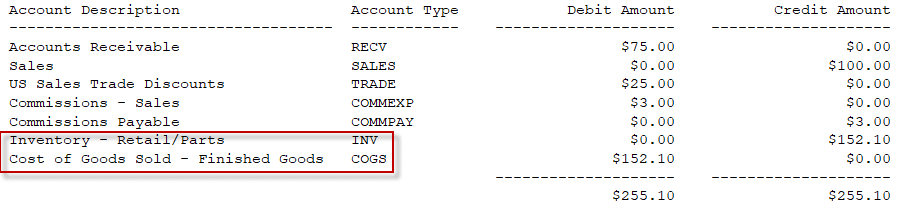
Note that the INV and COGS distributions are added at the moment of posting, because it is during posting when GP pulls inventory out of a specific FIFO layer, which allows it to determine the Actual Cost of the inventory being sold.
Because ACME serial numbers the finished goods, the Actual Cost is known as soon as a specific serial number is selected. Knowing the serial number also means that the Manufacturing Order which produced it can also be located, along with the actual material, labor and overhead costs that went in to the MO.
ACME would like to reallocate the COGS distribution to separate the total into the individual costs of Material, Labor and Labor Overhead.
Solution Overview:
During Sale Invoice Posting, additional posting accounts and distributions will be added to the transaction to reallocate the COGS amount into the individual cost buckets recorded on the Manufacturing Order.
Design Features:
Setup
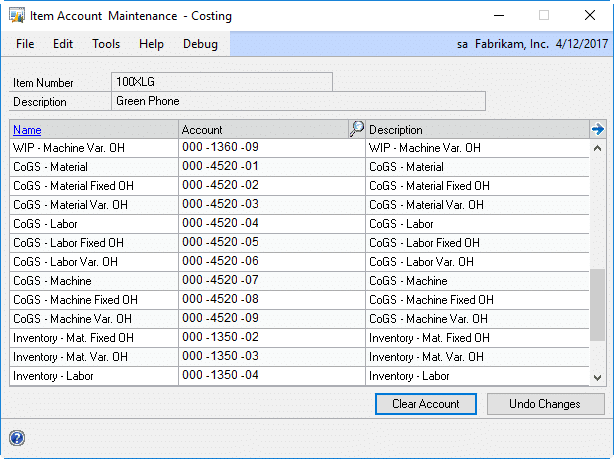
ACME will enter COGS accounts on the Item Account Maintenance- Costing window. The COGS Allocation described in the next section will only reallocate costs that have a matching GP Account in this window. For example, if only COGS-Material is present, the material cost from manufacturing will be subtracted from the IV COGS distribution and allocated to the COGS-Material account. Labor, Overhead, and any other costs will remain the in the IV COGS account.
COGS Allocation
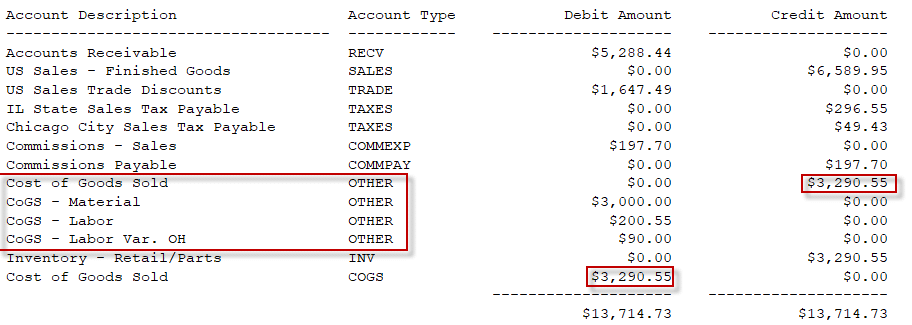
When a Sales Invoice posts, the new COGS Allocation routine will run to redistribute the SOP COGS amount into to detailed breakout recorded on the MO Receipt.
Note that in the screen capture above, the Account Type is OTHER because the Distributions window does not allow manually adding COGS distributions. When the COGS Allocation routine runs it will use the Account Type of COGS. Also, “SOP COGS” refers to the COGS account coming from either the Customer Maintenance or the Item Maintenance Accounts window.
The MO Receipt tracks costs in up to nine cost buckets, as shown below.
For each cost bucket on the MO Receipt where the dollar value is greater than $0, the COGS Allocation routine will:
- Add a distribution to credit the SOP COGS account (if such distribution does not already exist)
- Increase the SOP COGS credit amount by the Manufacturing Cost Amount
- Add a distribution to debit the appropriate Manufacturing COGS Account from the Item’s Costing Accounts setup for the Manufacturing Cost Amount
- Proceed to the next Manufacturing cost bucket
All distributions will be added with the Account Type of COGS.
In the event the item does not have a Manufacturing COGS Account, such as for Labor, but there is a Manufacturing Cost Amount in the bucket, the amount will NOT be allocated. It will remain in the SOP COGS account.
For information on this design, or any other WilloWare customization or product, please contact us:
WilloWare is now developing and creating products for BC D365!