Customization DS1496: Fund Accounting

Customization DS1496

Fund Accounting

Problem Definition:

ACME is a municipal wastewater treatment authority servicing several counties in Virginia. They have an existing fund account system outside Dynamics GP, and similar functionality needs to be provided inside GP.

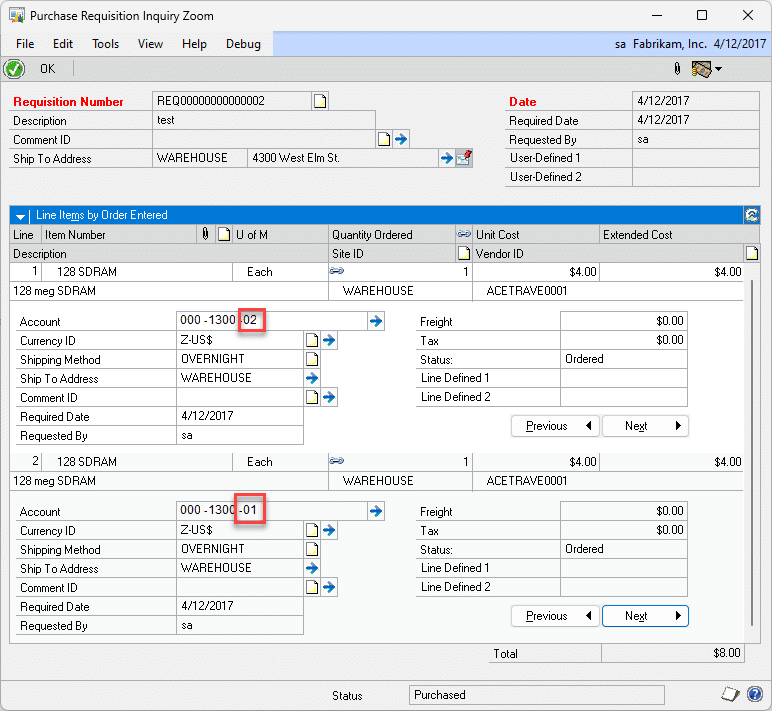
ACME will use the GP Purchase Requisitions window to enter a requisition. ACME uses the FIRST segment of the GL account to denote fund (the examples below use the 3rd segment, this is discussed in the Design Features section). Each line on the Requisition is assigned to a Fund. The account may be changed at any time by a reviewer/approver until a PO is created from the Requistion.

A screenshot of a computer

Description automatically generated

The Inventory Account (fund) flows through to the Purchase Order. Nothing needs to happen at this point. ACME always does a three part match, recording a separate Shipment and Invoice.

A screenshot of a computer

Description automatically generated

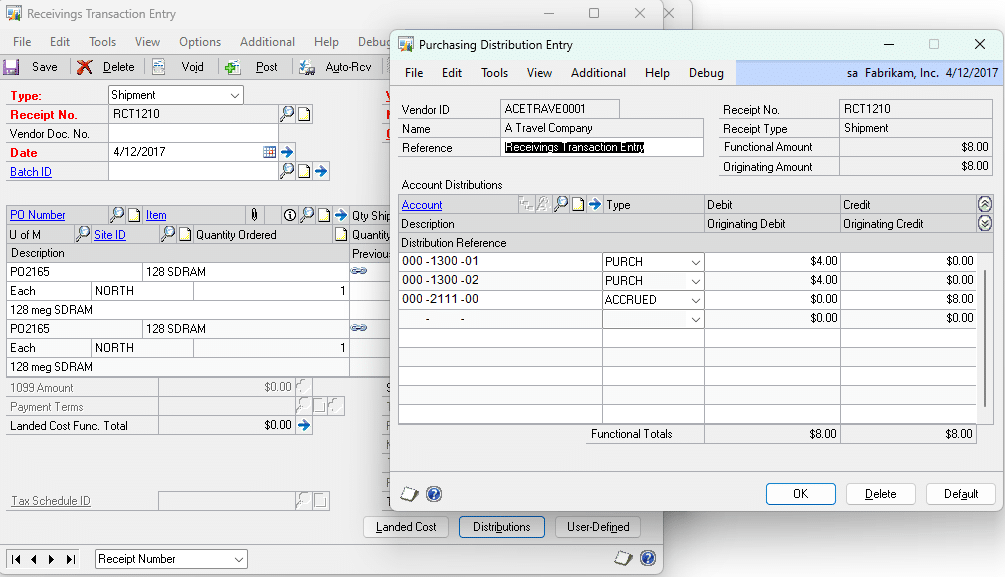
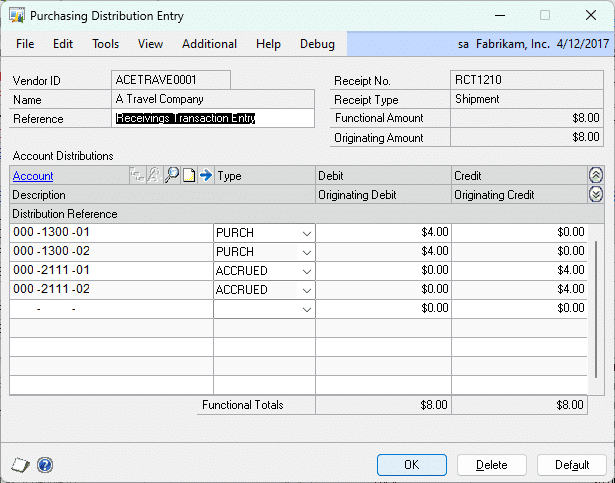
When the SHIPMENT is entered, the Fund Accounts have followed from the Requisition to the PO to the Shipment Distributions as the PURCH account. ACME needs the ACCRUED account to be (1) split into separate lines to match the number of PURCH lines, and (2) assign a Fund Account to each ACCRUED distribution that matches the PURCH distributions.

A screenshot of a computer

Description automatically generated

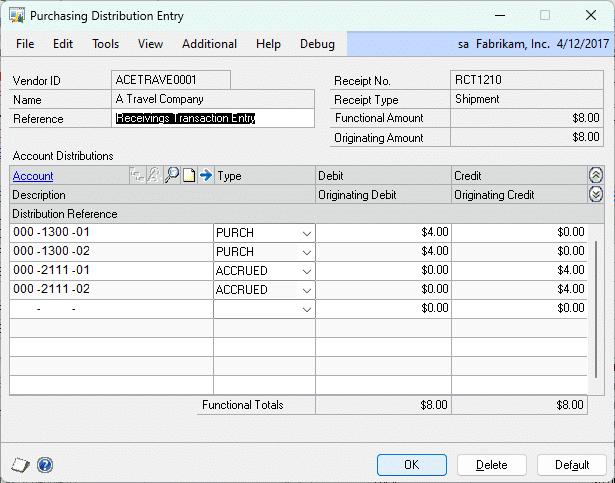
As shown, there are now separate ACCRUED distributions (-01 and -02) that match the PURCH distributions.

A screenshot of a computer screen

Description automatically generated

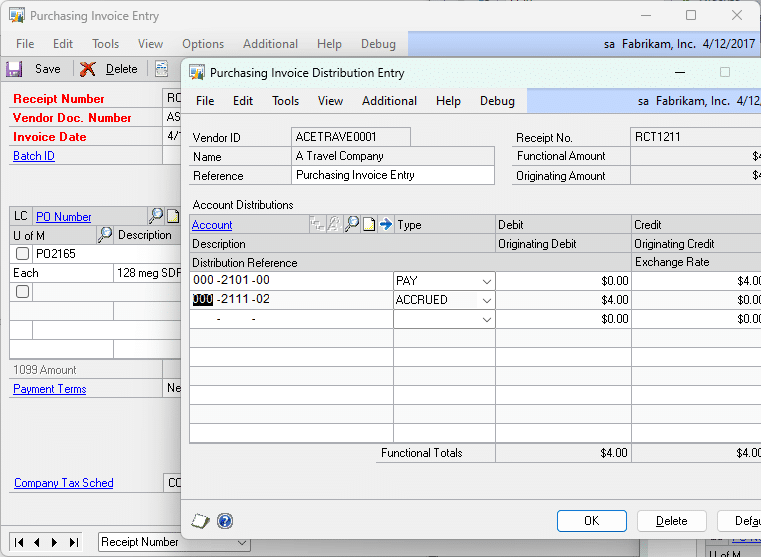
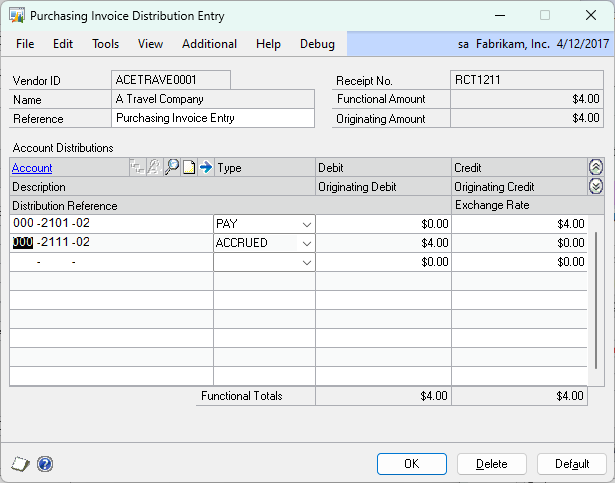
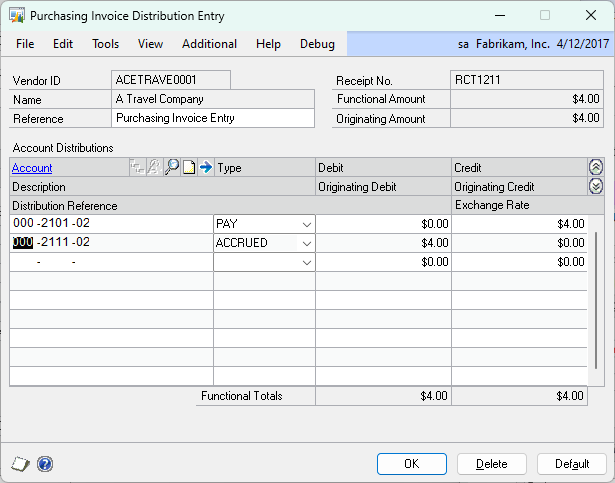
When the invoice is created, the PAY account will pull from the Vendor/Posting Setup. It needs to be changed to match the ACCRUED account.

A screenshot of a computer screen

Description automatically generated

As shown above, the PAY account has been changed to a corresponding Fund account (-02). ACME always enters Purchasing Invoices one per Fund, so in the example above, they would create one Invoice for the -02 fund and another for the -01 fund.

A screenshot of a computer

Description automatically generated

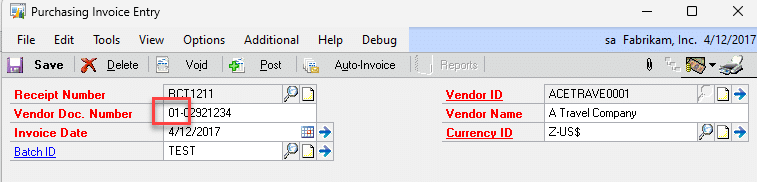
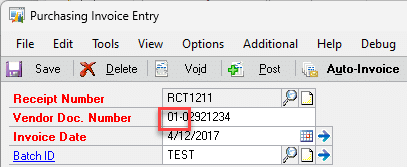
ACME would like to prefix the Fund onto the Vendor Doc. Number.

Design Features:

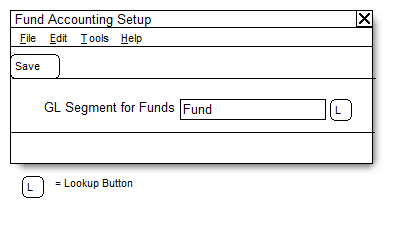
Navigation: Tools >> Setup >> Purchasing >> Fund Accounting

The Setup window will allow ACME to specify which GL Account Segment is used for “Fund”. They currently use the first segment, however having this is a setup option provides the flexibility for ACME to change their process in the future if needed.

A screenshot of a computer screen

Description automatically generated

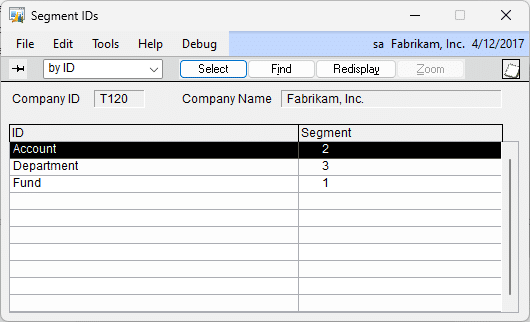
The Lookup button opens the GL Segment IDs lookup window:

A screenshot of a computer

Description automatically generated

POP Shipment

When GP creates the distributions, the enhancement will automatically alter the distributions so that there is an ACCRUED distribution with a Fund Segment that corresponds to each PAY distribution. It will do this by changing the FUND segment of the default ACCRUED distribution account to match the FUND segment on each PURCH distribution account. If this results in an invalid account, the user will be warned and no changes will be made.

In the example below, Fund is the 3rd Segment (-01 and -02).

A screenshot of a computer

Description automatically generated

Clicking DEFAULT will rebuild the distributions with the additional Fund distributions described above. The user will not need to click Default.

POP Invoice

ACME always creates one POP Invoice per Fund. The software will not require or enforce this. The first Shipment selected (either entered into the Purchasing Invoice window, or selected in the Select Purchase Order Items window, aka Auto-Select) will set the Fund Segment in the Vendor Doc Number:

A screenshot of a computer

Description automatically generated

NOTE: The enhancement will require that the Vendor Doc Number has been entered before the Auto-Invoice button can be clicked/before a Shipment can be entered into the scrolling window. If the resulting string is longer than 20 characters, the string will be truncated from the right to retain the Fund Number.

A screenshot of a computer screen

Description automatically generated

The PAY distribution will be changed automatically to a corresponding Fund GL account. It will do this by changing the FUND segment of the PAY distribution account to match the FUND segment on the ACCRUED distribution account. If this results in an invalid account, the user will be warned and the account number will NOT be changed.

For information on this design, or any other WilloWare customization or product, please contact us:

www.willoware.com/contact-me/

WilloWare is now developing products and customizations for BC D365. Please contact us to discuss your needs.


MFG PowerPack 2026-04-15

Release Date:15-APR-2026
GP Versions: 12/14/16/18
MFG PowerPack Build: 24.280
* MRP Alternates: the changes all pertain to issues encountered when handling a component that has multiple alternates. (1) when pulling the list of MRP Suggestions for items that have alternates the list was returned using the primary key on the MRP tables which essentially sorts by Order Number. This usually, but not always, corresponds to the requirement date, but could result in processing out of order. The query now sorts by Item, Site, Date then Order Number. (2) the process to get the alternate inventory available quantity would correctly return HasInv but on subsequent attempts if was failing to set the HasInv flag. If an altnerate had enough inventory to cover multiple MRP recommendations it would be used on the first requirement but skipped on following requirements. (3) the Consume Alternates routine was dropping the MRPAlt temp table when it was done meeting the requirement, which could come into play if the MRP Suggestions was not processed in order (see #1), and result in it attempting to use the same alternate quantity more than one, or conversely not attempting to use an additional alternate when there are multiple. Consume Alternates now retains the table for the entire process.

Customization DS1493: PO Entry User Control

Customization DS1493

PO Entry User Control

Problem Definition

ACME is a privately owned mental health facility in the United States. As part of a requirement to increase controls in Dynamics GP, ACME would like to add the following functionality to the Purchase Order Entry:

  • Users can access their own POs in PO Entry (if they created it, they can edit it).
  • Managers have the same access as Users, plus they can access the POs for any user the manage.
  • Power Users can access all POs.

The controls are to be applied only to the PO Entry window. It is OK if POs are visible to all users in the Inquiry windows, reports and SmartList.

Design Features

Managers:

Cards >> Payroll >> Employee

A screenshot of a computer

Description automatically generated

ACME does not use Payroll in GP. They will use the Employee Maintenance window to maintain the Manager-Employee relationship needed for the PO Entry controls. All users who enter or approve POs must be set up as an Employee in this window. Create employee records for all Purchasing employees first, then perform the Supervisor Setup.

Enter an Employee ID and Name. The SSN is a required field, but it can be all 9s. Create “default” Department and Position codes, as they are required to set up an Employee record but will not be used.

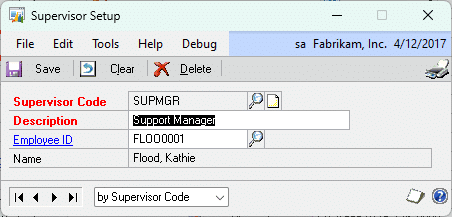
Supervisor: select a Supervisor Code. Each Supervisor Code is assigned to only one Employee ID, and each Employee can have only one Supervisor. An Employee who is a Supervisor can themselves have a Supervisor assigned to them. The PO Controls will check all levels of the management tree to determine is a Supervisor is allowed to access a User’s PO.

A screenshot of a computer

Description automatically generated

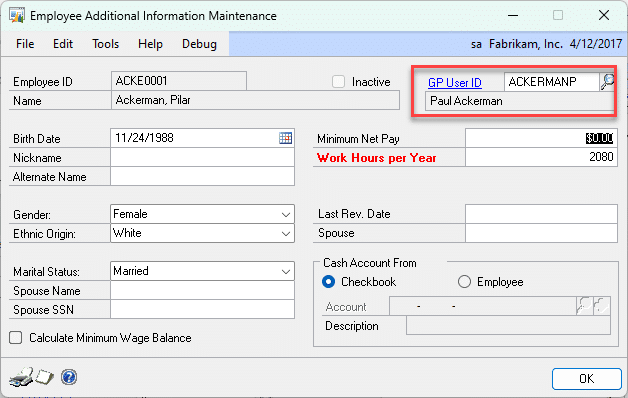
Click the ADDITIONAL INFORMATION button

A screenshot of a computer

Description automatically generated

Enter the GP User ID associated with the Employee ID. This must be entered for the PO Controls to function.

PO Controls:

User Control

When a Purchase Order is created, the GP User ID that created the PO is stored in the database (it is not visible on the PO Entry window). When a user creates a PO they will always be able to access it in the PO Entry window.

If a user attempts to select a PO that they did not create or are not given access to as a Manager or Power User, they will be given this warning: You are not permitted to access this Purchase Order. The PO will then be cleared from the PO Entry window.

Manager Control

If the PO was created by a user that is below the current GP User ID in the management hierarchy, they will be able to access the PO. There can be an unlimited number of management levels, the PO Manager Control will traverse the entire management hierarchy below the current GP User ID to see if they are allowed to access a PO.

Power User

Any user assigned to the Dynamics GP Power User Security Role will be allowed to access all POs.

For information on this design, or any other WilloWare customization or product, please contact us:

www.willoware.com/contact-me/

WilloWare is now developing customizations and products for BC. Please contact us for your BC D365 needs.


Customization DS1280: PM-RM Consolidation Automation

Customization DS1280

PM-RM Consolidation Automation

Problem Definition:

Auto-create Vendor for Customer

ACME uses the Refund Checks module in Dynamics GP. After creating a Customer they would like to automate the steps of creating a Vendor and linking the Customer ID to the Vendor ID in the Customer/Vendor Relationships window. ACME always uses the Customer ID as the Vendor ID. The current process provided by GP requires several manual steps. ACME would like the process of creating the Vendor record, and creating the Customer-Vendor Relationship record, to happen automatically after a new Customer is created.

Customer-Vendor Relationship

Automatically create an AP-to-AR transaction for every POP Shipment/Invoice created for specific Items where a Customer-Vendor relationship already exists.

  • There will only ever be one item on the Shipment/Invoice transaction
  • No additional amounts are included on the Shipment/Invoice (i.e. taxes, discounts, freight).
  • Identify the Items with a UDF field
  • ACME does not use multi-currency

Design Features

Auto-Create Vendor for Customer

There will be no user interface change or other visible changes to GP.

After saving a Customer record, the enhancement will:

  • Check if a Vendor ID exists that matches the Customer ID. If NOT:
  • It will create a new Vendor record using information from the Customer. The Vendor will be created in the same manner as GP does currently with the AP-AR Consolidation module, however it will happen in the background without opening the Vendor Maintenance window.
  • It will create a new Customer-Vendor Relationship record without opening Customer/Vendor Relationships window

Auto-Create PM-RM Balance Transfer

There will be no visible change inside GP with this enhancement.

When a POP Receipt (Shipment/Invoice transactions only) is posted (one at a time through the POP Receipt Entry window, or from the POP Batch Entry window), the enhancement will:

  • Check if the POP Receipt contains one and one item, and that item has UDF#1 = PMRMXFR. If so, the enhancement will:
  • Create a PM Credit Memo, post it, and apply it to the POP Receipt.
  • Create an RM Credit Memo and post it.

The documents will be created as if they had been generated by the Customer/Vendor Consolidations window. For example, the Default Suspense Account will be used from Customer/Vendor Consolidation Setup, the document numbering will be the same, document description fields will be populated in the same manner, and batch numbering logic will be the same.

For information on this design, or any other WilloWare customization or product, please contact us:

www.willoware.com/contact-me/

WilloWare is now developing products and customization for BC D365. Please contact us to discuss your needs!

Customization DS1280

PM-RM Consolidation Automation

Problem Definition:

Auto-create Vendor for Customer

ACME uses the Refund Checks module in Dynamics GP. After creating a Customer they would like to automate the steps of creating a Vendor and linking the Customer ID to the Vendor ID in the Customer/Vendor Relationships window. ACME always uses the Customer ID as the Vendor ID. The current process provided by GP requires several manual steps. ACME would like the process of creating the Vendor record, and creating the Customer-Vendor Relationship record, to happen automatically after a new Customer is created.

Customer-Vendor Relationship

Automatically create an AP-to-AR transaction for every POP Shipment/Invoice created for specific Items where a Customer-Vendor relationship already exists.

  • There will only ever be one item on the Shipment/Invoice transaction
  • No additional amounts are included on the Shipment/Invoice (i.e. taxes, discounts, freight).
  • Identify the Items with a UDF field
  • ACME does not use multi-currency

Design Features

Auto-Create Vendor for Customer

There will be no user interface change or other visible changes to GP.

After saving a Customer record, the enhancement will:

  • Check if a Vendor ID exists that matches the Customer ID. If NOT:
  • It will create a new Vendor record using information from the Customer. The Vendor will be created in the same manner as GP does currently with the AP-AR Consolidation module, however it will happen in the background without opening the Vendor Maintenance window.
  • It will create a new Customer-Vendor Relationship record without opening Customer/Vendor Relationships window

Auto-Create PM-RM Balance Transfer

There will be no visible change inside GP with this enhancement.

When a POP Receipt (Shipment/Invoice transactions only) is posted (one at a time through the POP Receipt Entry window, or from the POP Batch Entry window), the enhancement will:

  • Check if the POP Receipt contains one and one item, and that item has UDF#1 = PMRMXFR. If so, the enhancement will:
  • Create a PM Credit Memo, post it, and apply it to the POP Receipt.
  • Create an RM Credit Memo and post it.

The documents will be created as if they had been generated by the Customer/Vendor Consolidations window. For example, the Default Suspense Account will be used from Customer/Vendor Consolidation Setup, the document numbering will be the same, document description fields will be populated in the same manner, and batch numbering logic will be the same.

For information on this design, or any other WilloWare customization or product, please contact us:

www.willoware.com/contact-me/

WilloWare is now developing products and customization for BC D365. Please contact us to discuss your needs!


Customization DS0720- Update SOP Accounts

Customization DS0720

Update SOP Accounts

Problem Definition:

ACME utilizes Dynamics GP in their Sales Order Processing. Standard Dynamics GP functionality allows the user to set the posting accounts for Sales Invoices and Sales Return documents to either pull from the Item Number or the Customer. ACME requires some posting accounts to correspond with their Selling Application and Channel. In the instance that they are selling a JV Tile Item, the posting account may need to be updated based on the Item and the Channel.

ACME’s Chart of Account structure is 3 segments:

  • Segment 1: Two digits and represents “Selling Location”
  • Segment 2: Five digits and represents the “Natural Account”
  • Segment 3: Three digits and represents the “Channel”

ACME uses the Sale Document’s User Defined List fields to house the corresponding Selling Location and Channel. The enhancement should include an Posting Account Update Utility that will update Segment 1 of the GL to the first 2 digits of UDF List Field #1 AND update Segment 2 of the GL to the first 3 digits of UDF List Field #2:

UDF List Field #1: Selling Location

Current options for UDF List #1 include:

  • 10-Wholesale
  • 20-ACME

UDF List Field #2: Channel

Current options for UDF List #2 include:

  • 101-BKSR
  • 103-SISR
  • 104-NYRS
  • 201-ACME.COM
  • 202-MB.COM
  • 300-eBay
  • 302-Amazon

ACME’s JV Tile Items all begin with the same prefix: “JV-TILE-“. When a JV Tile Item exists on the Sales Invoice or Sales Return document AND the Sales Document’s UDF List Field #2 is set to 101-BSKR, the GL Posting Account for the 3rd segment must be updated to “102”.

Not all GL Posting Accounts need to be updated by the enhancement. Only the following GL Posting Accounts should be substituted:

  • Sales
  • Accounts Receivable
  • Trade
  • Freight
  • Miscellaneous
  • Taxes
  • Markdown
  • COGS
  • Returns

Please Note: The Inventory Account should NEVER be updated.

ACME does not want the Posting Accounts to update automatically for the Sales Invoice or Sales Return documents during the Posting process. They would prefer that users select a Sales Batch from the Sales Batch Entry window. Then, the user should have access to manually run the Sales Posting Account Update Utility on each Sales Batch individually prior to posting the Batch. This will allow the user to print the Batch Edit List to review the changed accounts prior to posting.

Design Features:

Sales Posting Account Update Utility

Navigation: Transactions >> Sales >> Sales Batches >> Additional >> Account Update Utility

The user will enter the Sales Batch Entry window, enter a Batch ID or select one from the lookup, and navigate to Additional >> Account Update Utility

The enhancement will:

  1. Validate that at least one Sales Invoice or Sales Return document exists within the Sales Batch. The Posting Account Update Process will only update the Posting Accounts of Sales Invoice and Sales Return documents. If no Sales Invoices or Sales Return documents exist, the user will be warned of the condition and will be unable to continue.
  2. Validate that all Sales Invoice and Sales Return documents within the Batch ID are not active. For example, a document is considered active if a user has the document open in the Sales Transaction Entry window. (Active documents are included in the tempdb.DEX_LOCK table.) If any documents are active, the user will be warned of the condition and unable to continue.
  3. If the Sales Batch passes the validation step, the user will be prompted with the following message, “Update the Posting Accounts for this Batch?”  If the user selects NO, the enhancement will do nothing.  If the user selects YES, the enhancement will run the Posting Account Update Utility process.
  4. The enhancement will update the Posting Accounts of each Sales Invoice and Sales Return in the Batch in the following manner:
  5. The enhancement will select the first Sales Invoice or Sales Return document from within the Batch that contains a value in either the UDF List Field #1 or in the UDF List Field #2. If the Sales Invoice or Sales Return document does not contain a value in either field, the document will be skipped.

PLEASE NOTE: For the steps that follow, if the enhancement attempts to update a GL Account to an invalid GL Account during the process, the GL Account will NOT be updated.  All validated GL Accounts will be updated.  An error report will print, at the end of the process, detailing the Sales Document Number, current GL Account and invalid GL Account.

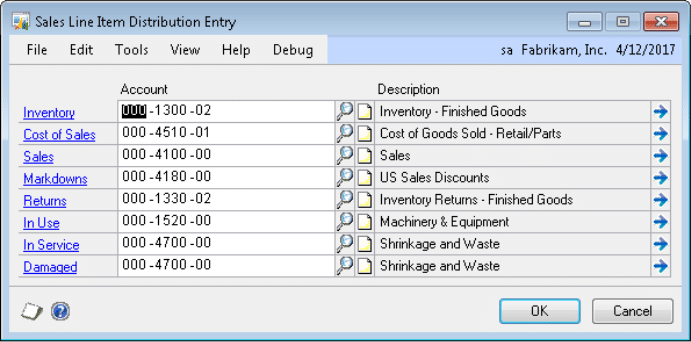
  1. The enhancement will attempt to update the Sales Line Item Posting Accounts first. The Sales Line Item Posting Accounts to update include the following GL Accounts:

-Cost of Sales

-Sales

-Markdowns

-Returns (For Sales Return Documents only.)

The enhancement will update all Sales Line Item’s Posting Accounts referenced above, regardless of whether the Account will be utilized during the Posting process or not. For example, the Markdown Account will be substituted even if there is NOT a Markdown Amount or Percentage on the Sales Line.

The enhancement will update the Sales Line Items’ Posting Accounts in two steps.  The first step is to update Sales Lines Items which contain the following Item Numbers:

-All Non-JV Tile Lines (Item Numbers which do NOT start with JV-TILE-“)

– JV Tile Lines where UDF List Field #2 is NOT set to 101-BKSR

Segment 1 of the GL Account will be updated to the first 2 digits of the value in UDF List Field #1.  If a value does NOT exist in UDF List Field #1, then Segment 1 will not be updated.

Segment 3 of the GL Account will be updated to the first 3 digits of the value in UDF List Field #2.  If a value does NOT exist in UDF List Field #2, then Segment 3 will not be updated.

The second step is to update:

  • All JV Tile Lines where UDF #2 is set to 102-BKSR

Segment 1 of the GL Account will be updated to the first 2 digits of the value in UDF List Field #1.  If a value does NOT exist in UDF List Field #1, then Segment 1 will not be updated.

Segment 3 of the GL Account will be updated to “102”.

PLEASE NOTE: Updating the Sales Line Items first, allows the enhancement to properly recalculate the Sales Order Header GL Accounts and Distribution totals from the Sales Lines.  This includes updating the Sales Order Header’s:

  • Sales Account(s) and totals
  • COGS Account(s) and totals
  • Markdown Account(s) and totals
  • Return Account(s) and totals

The enhancement will then attempt to update the Sales Header Posting Accounts. The Sales Header Posting Accounts to be updated include the following GL Accounts:

  • A/R Account
  • Freight
  • Trade Discounts
  • Taxes
  • Miscellaneous


Unless noted as an exception below, Segment 1 of the GL Account will be updated to the first 2 digits of the value in UDF List Field 1. Segment 3 of the GP Account will be updated to the first 3 digits of the value in UDF List Field 2.

EXCEPTIONS:

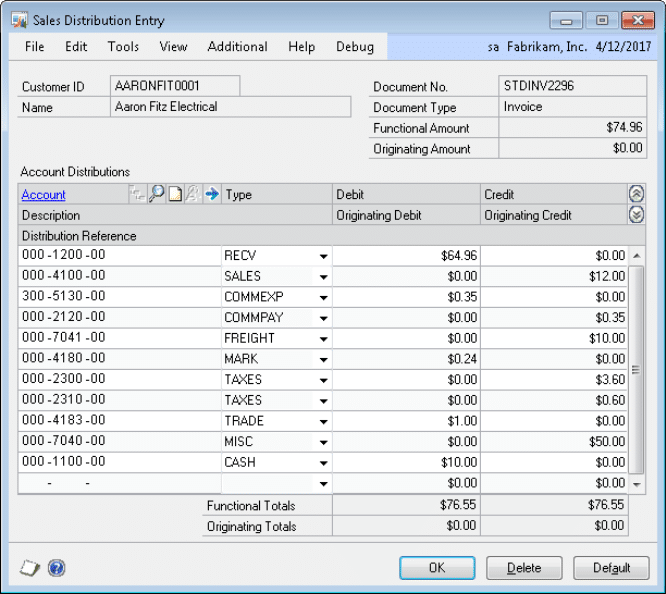
A/R Account:  If JV Tile Lines exist on the Sales Document and the UDF List #2 is set to 101-BKSR, then the enhancement will create an additional RECV line for the value of the JV Tile Lines.  The value of the JV Tile Lines will be calculated as the sum of the Extended Price of the JV Tile Line Items.  The Extended Price includes any Markdowns for the Sales Line Item already.  The original RECV line will be reduced by the same amount.

PLEASE NOTE:

  1. If additional Sales Line Items or charges are added to the Sales Invoice or Sales Return document, the user must run the Posting Account Update Utility again to ensure all Sales Posting Accounts are updated.
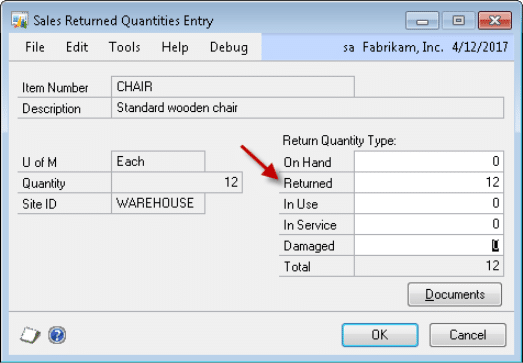
  2. As defined in the ACME requirements, the Sale Return Account will only be updated if a user enters a Quantity into the “Returned” Quantity Type as noted by the red arrow below.

Entries into “On Hand” will impact the Inventory Account; Entries into In Use will impact the In Use Account; Entries into “In Service” will impact the In Service Account; Entries into “Damaged” will impact the Damaged Account.  These accounts are NOT included in the update utility at ACME’s request.

  1. The following GL Accounts and totals will NOT be broken out to include a separate entry for JV Tile Lines should they exist on the Sales Document: Trade Discounts, Freight, Miscellaneous, Taxes.

Assumptions/Requirements:

  1. ACME’s Valuation Method is FIFO Perpetual
  2. The Manufacturing Module is NOT utilized
  3. Kits are used
  4. Service, Flat Fee and Misc Charge Items are NOT used
  5. Dropship Sales Line Items are used
  6. The Posting Account Update Utility will update only the GL Posting Accounts for the Sales Invoice and Sales Return documents
  7. Non-Inventory Items (Items not in the Item Master) are Not used
  8. The Sales Order Processing Setting for Posting Accounts is set to Item
  9. This enhancement does NOT include any modifications to the Batch Edit List
  10. Although GL Accounts in the Sales Tax Summary Entry window may be updated by the user, the enhancement will only change the resulting Tax GL Accounts on the Sales Distribution Entry window and will not change the Sales Tax Summary Accounts.
  11. The enhancement will update the Trade Discounts, Freight, and Miscellaneous GL Accounts within the Sales Distribution Entry window only.


Customization DS1535- Additional GL Entry Fields

Customization DS1535

Additional GL Entry Fields

Problem Definition:

ACME needs to track two additional fields to GL transactions. These fields need to store at least 16 character string values. They will be imported via SmartConnect and displayed and editable on GL Transaction Entry. The fields also must be displayed and read-only from GL Inquiry.

ACME needs them accessible via SmartLists, SQL views and SQL reports.

Solution Overview:

A new table will be added to the company database(s) to store the required information. The AQL table name and SQL field names will be provided upon delivery of the code. The structure will be as follows:

Table: wGLAuthExt

Field Function
Journal Entry The GL Transaction JE Number. This is a key field of the the table.
Sequence Line The line sequence number that will tie back to the GL transaction sequence number in the line table. This is a key field of the table.
AuthCode The Authorization Code imported from SmartConnect. This is a 50 character string.
AuthType The Authorization Type imported from SmartConnect. This is a 50 character string. This field is a list field with three values- CVENT, AMEX, VANTIV, however ACME will be inserting the value as a string, so this field will record and display it as a string.

ACME will use SmartConnect to populate all fields of this table. There are no scripts included in this estimate that will add data to this table.

The wGLAuthExt table will share a one-to-one relationship with the GL Line table (GL10001). It can be used to create SQL Views to combine the two tables and present the data in SmartLists or reports.

The data in wGLAuthExt will not be moved to a posted table. The same table can be used to link to the GP Open table (GL20000) for viewing after the transaction is posted.

Design Features:

GL Transaction Entry

Navigation: Transactions >> Financial >> General

A screenshot of a computer

Description automatically generated

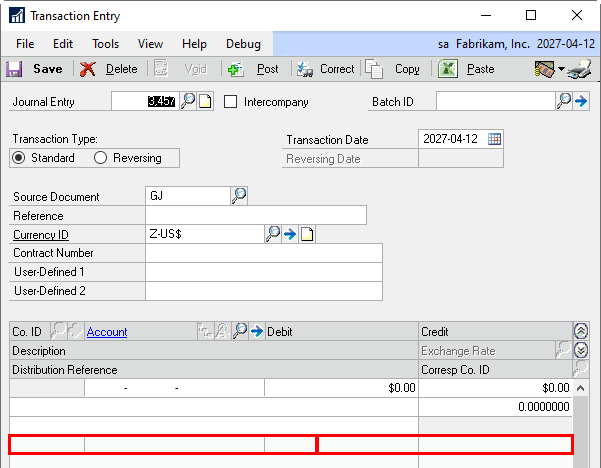
The Transaction Entry window will be modified to add the Authorization Code and Type. The modified window will be included with the project and user security will need to be updated to use the custom version. If the Transaction Entry window is currently modified, the existing modifications will not be included.

Field Function
Authorization Code Displays the Authorization Code from the table. This field is editable and will accept free-entry text, similar to a user defined field.
Authorization Type Displays the Authorization Type from the table. This field is editable and will accept free-entry text, similar to a user defined field.

GL Transaction Inquiry

Navigation: Inquiry >> Financial >> Journal Entry Inquiry

A screenshot of a computer

Description automatically generated

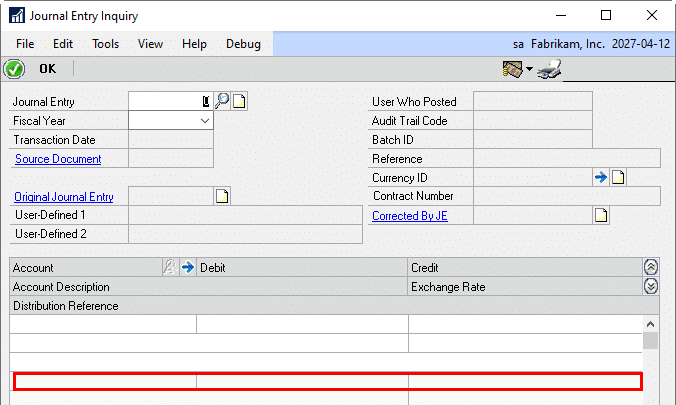
Similar to Transaction Entry, the Journal Entry Inquiry window will be modified to add the Authorization Code and Type. The modified window will be included with the project and user security will need to be updated to use the custom version. If the Transaction Entry window is currently modified, the existing modifications will not be included.

Field Function
Authorization Code Displays the Authorization Code from the table.
Authorization Type Displays the Authorization Type from the table.

For information on this design, or any other WilloWare customization or product, please contact us:

www.willoware.com/contact-me/

WilloWare is now developing customizations and products for BC D365- Please contact us to discuss your needs!


Customization DS1512- MO Manager

Customization DS1512

MO Manager

Problem Definition:

ACME produces large Design to Order/Configure to Order/Engineer to Order equipment for the horticulture industry. They use Dynamics GP Manufacturing with WilloWare’s MO Generator. A “Master Assembly” (top level item) may be made from a large number of subassemblies, sometimes up to 140. MO Generator creates “Child MOs” for each of these subassemblies. ACME needs an efficient way to manage all of the subassembly manufacturing orders. They would like to be able to:

  • See all related MOs in one place
  • Have an easy way to see the “status” of MOs (not the MO Status, but where things are in the process from procurement to picking to production)
  • Provide a way for Kitters to record picking transactions that can easily be reviewed by office staff before being entered into Component Transaction Entry
  • Easily see component shortages for subassemblies
  • Provide a way for Builders to record changes they make and indicate when the MO is done
  • See when subassembly MOs are complete

A similar process occurs with Conveyors. A sales order is created with one sales line for each component of the conveyor. Manufacturing Orders are created and linked to each sales line. ACME would like to be able to manage these related MOs in the same manner as described above.

The Master Assembly-Subassembly (Parent-Child) structure is only one level deep. With Conveyors, the “top” level is the Sales Order itself, with one level of MOs below that.

ACME does NOT use multi-bins. The “bin number” field is used on the Item Quantities Maintenance window. Most items, but not all, are assigned a BIN. Items that do not have a BIN assigned do not need to be picked so do not need to be shown in the user interface.

Solution Overview

WilloWare will create a new window in GP called “MO Manager” that will pull together all of the information for a related set of manufacturing. Color coded icons will help users visually identify component shortages, and MOs ready to be picked, among other things. MO Manager will be able to create a Pick Transaction that is informational only until reviewed by office staff, and Build Transaction that tells office staff the MO is Done and ready to be received.

Design Features

Bin Routing

Navigation: Tools >> Setup >> Manufacturing >> Bin Routing

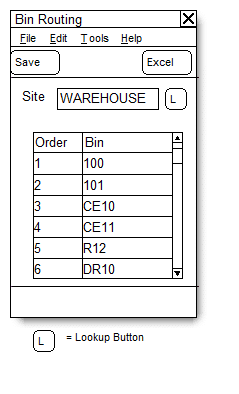
The Bin Routing window is used to specify the most efficient way for a Kitter to traverse the warehouse when picking inventory. The Picking window in MO Manager will display the picklist bins in the order specified in the Bin Routing window so that Kitters know where to go first to get inventory, then where the next stop is, and so on until the entire picklist has been picked.

A screenshot of a warehouse

Description automatically generated

Field Function
Site Select a Location Code (Site)
Order System generated, increments by 1 as each Bin is entered
Bin Enter a Bin

The most efficient way to load the Bin Routing window is through Excel. Create a spreadsheet with the bins listed in the desired order. Save the spreadsheet. Click the Excel button and locate the file. The existing list of BINS will be cleared (deleted) and replaced by the Excel import.

The Excel file should NOT have a column header. But the first BIN in cell A1, then A2, etc.

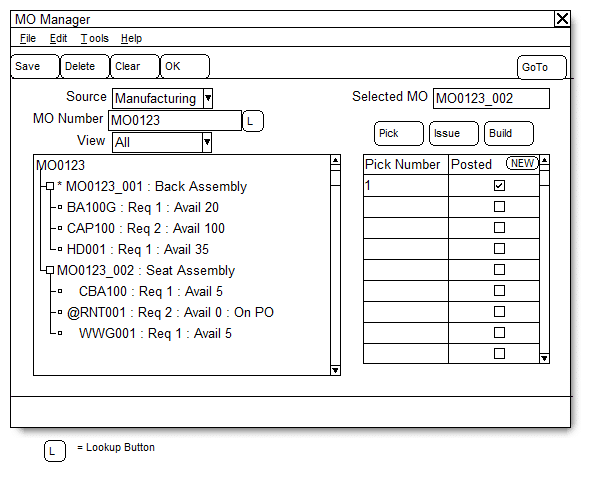
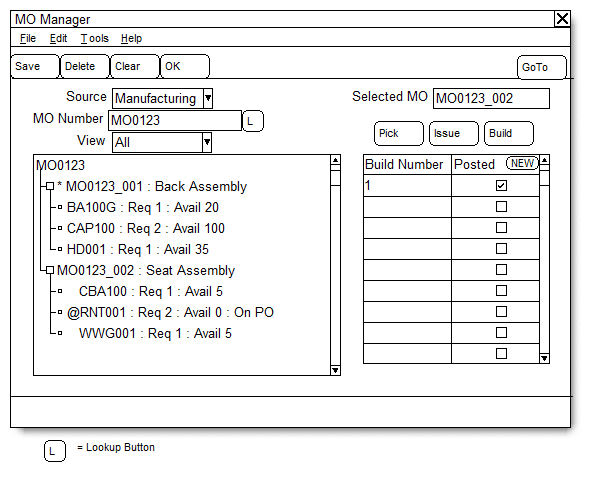
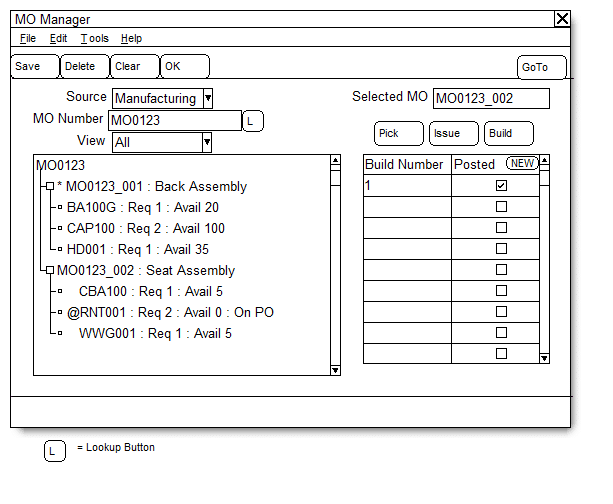
MO Manager

Navigation: Transactions >> Manufacturing >> MO Manager

A screenshot of a computer

Description automatically generated

Field Function
Source Options:

  • Manufacturing
  • Sales
MO Number/Sales Order Depending on the Source selected, the label for this field will show either MO Number or Sales Order. When an MO is selected, the treeview will fill with MOs that are linked by the MO Number. (parent and child). When Sales Order is selected, the treeview will fill with MOs linked to the Sales Order through the MOP-SOP Links table.
View Options:

  • All
  • Ready to Pick: GP shows there is enough available inventory to pick everything on the picklist
  • Pending Pick Transaction: A Kitter recorded a Pick Transaction in MO Manager. Office staff need to RELEASE the MO (if it is not released) and create an ISSUE Transaction in MFG Component Transaction Entry.
  • Partial Pick: At least some of the inventory has been picked but one or more picklist items remains to be picked or completely picked. A Partial Pick means there were inventory shortages.
  • Pending Build Transaction: A Builder recorded production in the Build window and marked the MO as DONE. Office staff need to post an MO Receipt for the MO.
  • Done: MOs that have ben Received (MO Status is Partial Receipt, Completed or Closed.
Go To Options include:

  • MO Entry
  • MFG Component Transaction Entry
  • MO Receipt Entry
  • MO Activity
  • Sales Transaction Entry
  • Item Inquiry

Click on an MO (or any of the components below the MO) to “select” the MO in the right side of the window. Once selected, click Pick, Issue or Build to view those documents for the selected MO.

Component Icons

The following icons appear next to each component to indicate the picking status of the component.

  • = Not picked, no inventory available
  • = Not picked, partial inventory available
  • = Not picked, full inventory available
  • = Partial pick, no inventory available for remaining requirement
  • = Partial pick, partial inventory available for remaining requirement
  • = Partial pick, full inventory available for remaining requirement
  • = Completely picked

MO Status Icons

The following icons appear next to each MO to indicate the status.

  • = Open MO, no inventory picked
  • = Pending Pick Transaction
  • = Open MO partially picked
  • = Open MO completely picked. MO is ready to be RELEASED
  • = Released MO
  • = MO partially received
  • = MO Complete

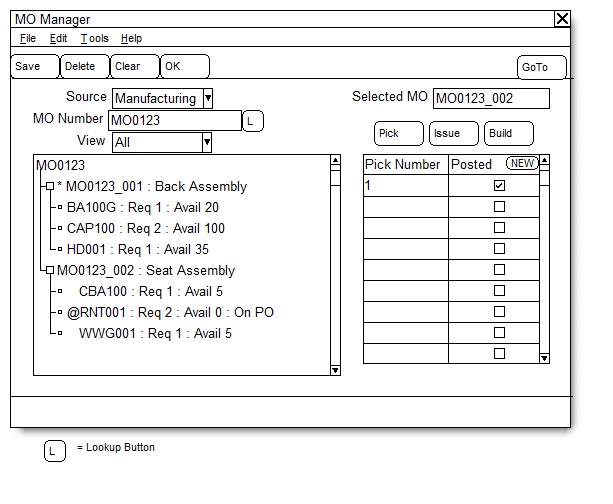
PICK BUTTON: This is used by Kitters to create a Pick Transaction. Select an MO then click the PICK button to view Picks linked to the MO or to create a new Pick. See the PICK section of the documentation for more details.

ISSUE BUTTON: When a Pick has been recorded, office staff need to Release the MO and create an ISSUE transaction. Click the ISSUE button, then click NEW. If the MO is not already RELEASED, the MO Entry window will open automatically and display the selected MO. Change the MO Status to Released, save the MO, close MO Entry and return to MFG Manager. Click the NEW button again to open the MCTE window. See the ISSUE section of the documentation for more details.

BUILD BUTTON: This is used by Builder to create a Build Transaction. Select an MO, then click the BUILD button to view Build Transactions linked to the MO or to create a new Build. See the BUILD section of the documentation for more details.

TREEVIEW: The treeview displays the Parent MO (Master Assembly) and all of the related subassembly MOs. In the case of Conveyors, it shows the Sales Order Number and all of the MOs linked to the Sales Order.

  • For the MO lines it will show: MO Number, Item Number, Item Description
  • For the Component lines it will show: Item Number, Description, QTY Required, QTY Remaining (i.e. QTY Required less QTY already picked), QTY Available

PICK

A screenshot of a computer

Description automatically generated

A screenshot of a computer

Description automatically generated

Select an MO, then click the PICK button to view Picks linked to the MO or to create a new Pick. To view an existing Pick, click on it in the scrolling window, then click the “Pick Number” zoom in the header of the scrolling window.

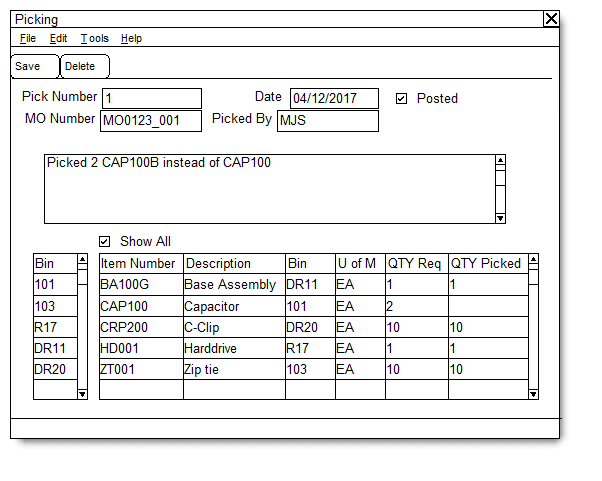
To create a new Pick, click the NEW button. The Picking window will open. The Picking window is used by Kitters to enter a pick.

Field Function
Pick Number System generated. Increments by 1 for each Pick.
MO Number Displays the MO Number selected in the MO Manager window.
Date Defaults to the User Date. If the Pick occurred on a different date it will be changed to the correct date.
Picked By Defaults to the GP User ID. Something different can be entered if needed.
Posted When office staff enters the Pick as an ISSUE Transaction in Component Transaction Entry, mark the Posted box. This will remove the “Pending Pick” status from the MO.
Comments Box Enter free text comments, notes, messages, etc. here. This can be used to provide details of component substitutions.
BIN Scrolling Window This window shows the bins that must be visited to pick this MO. The bins are shown in the most efficient travel pattern, so start by going to the bin at the top of the last and work your way down the list.

DOUBLE CLICK on a bin to change the parts list so it shows ONLY the parts to be picked from the selected bin.

When you select a bin, the Show All box unmarks automatically. Re-mark it to see all items in all Bins.

ITEMS Scrolling Window This window shows the picklist for the MO sorted by Item Number. When a BIN is selected, the window will show only the Items in that BIN.

QTY Required is the Quantity Required Remaining (i.e. QTY Required – QTY Issued.)

Enter the Quantity Picked.

ISSUE

A screenshot of a computer

Description automatically generated

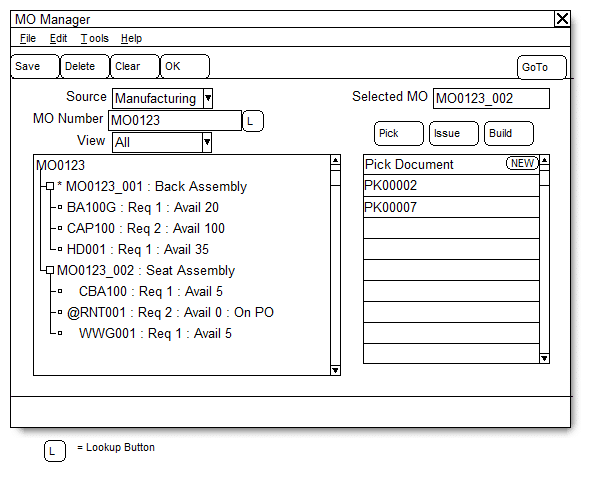
A Pick Transaction is informational ONLY. It does not affect inventory in GP. When a Pick Transaction is saved, the MO Manager window will show the status of the MO as “Pending Pick Transaction”. A Pending Pick Transaction must be recorded as an “Issue Transaction” in the MFG Component Transaction Entry window. Use the following steps:

  • Select the MO in the treeview, then click the PICK button
  • Select the Pending Pick (the Posted box is not marked), then click the “Pick Number” zoom to open it in the Picking window. You can now view the Pick as recorded by the Kitter so you have it open while creating the Issue Transaction.
  • Then click the ISSUE button and click NEW.
  • If the MO is not already RELEASED, the MO Entry window will open with the MO Number selected, and the Transaction Type set to ISSUE.
  • Enter the Pick Transaction information into the MFG Component Transaction window, then POST the Issue Transaction.

BUILD

A screenshot of a computer

Description automatically generated

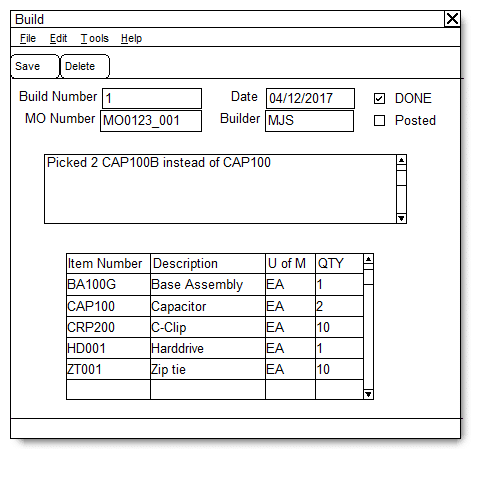
The Build window is used by Builders to record Production. When production is complete, follow the steps below to record a Build Transaction:

  • Select the MO, then click BUILD and click NEW. The Build window (above) will open.
  • Enter notes for the MO, such as component substitutions.
  • Mark the DONE checkbox. The POSTED checkbox cannot be marked until DONE is marked. Posted is used by office staff after the MO Receipt as been recorded.
  • Save the Build Transaction.
  • MO Manager will now show the status of the MO as “Pending Build Transaction”.

RECEIVE

A screenshot of a computer

Description automatically generated

When the status of an MO is “Pending Build Transaction” the office staff need to record an MO Receipt:

  • Select the MO in the treeview
  • Click BUILD. Click on the Build Transaction then click the “Build Number” zoom in the header of the scrolling window to open the Build window and display the Build Transaction.
  • Click Go To >> MO Receipt Entry
  • Use the notes from the Build Transaction to create and POST an MO Receipt.
  • On the Build window, mark the POSTED checkbox and click SAVE.

For information on this design, or any other WilloWare customization or product, please contact us:

www.willoware.com/contact-me/

WilloWare is now developing customizations and products for Business Central D365! Contact us to discuss your needs.


Customization DS1142- COGS Allocation

Customization DS1142

COGS Allocation

Problem Definition:

ACME is a utility-scale manufacturer of tubular wind towers. They use GP Manufacturing in an actual cost environment. They record WIP Labor and actual material consumption. One MO produces one (and only one) serial-numbered tower.

Because inventory items are Actual Cost, GP does not track the individual costs (such as labor and material) that make up the finished good cost. When the item is sold and the Sale Invoice posts, GP credits Inventory for the total item cost, and debits COGS accordingly.
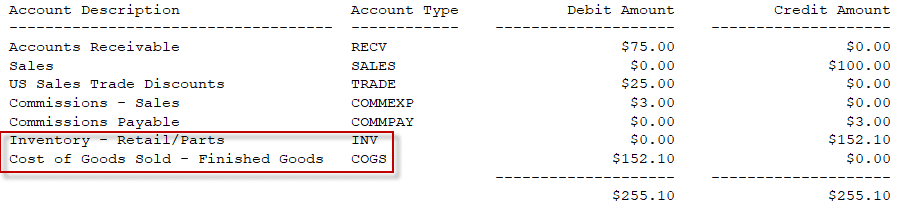
Note that the INV and COGS distributions are added at the moment of posting, because it is during posting when GP pulls inventory out of a specific FIFO layer, which allows it to determine the Actual Cost of the inventory being sold.

Because ACME serial numbers the finished goods, the Actual Cost is known as soon as a specific serial number is selected. Knowing the serial number also means that the Manufacturing Order which produced it can also be located, along with the actual material, labor and overhead costs that went in to the MO.

ACME would like to reallocate the COGS distribution to separate the total into the individual costs of Material, Labor and Labor Overhead.
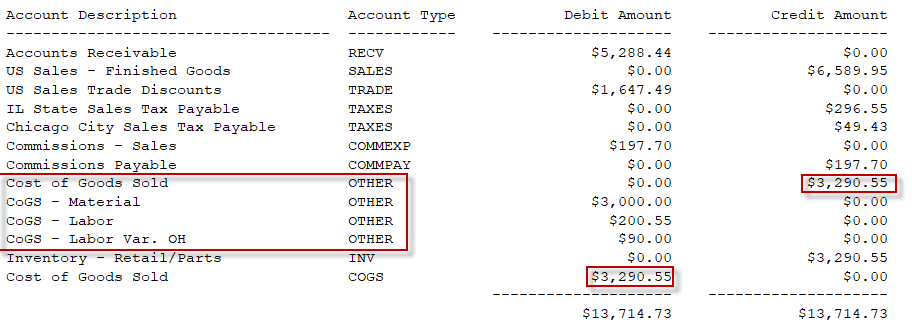
Solution Overview:

During Sale Invoice Posting, additional posting accounts and distributions will be added to the transaction to reallocate the COGS amount into the individual cost buckets recorded on the Manufacturing Order.

Design Features:

Setup
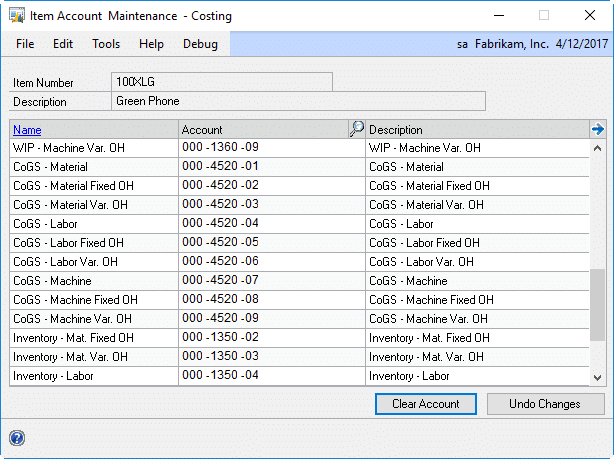
ACME will enter COGS accounts on the Item Account Maintenance- Costing window. The COGS Allocation described in the next section will only reallocate costs that have a matching GP Account in this window. For example, if only COGS-Material is present, the material cost from manufacturing will be subtracted from the IV COGS distribution and allocated to the COGS-Material account. Labor, Overhead, and any other costs will remain the in the IV COGS account.

COGS Allocation

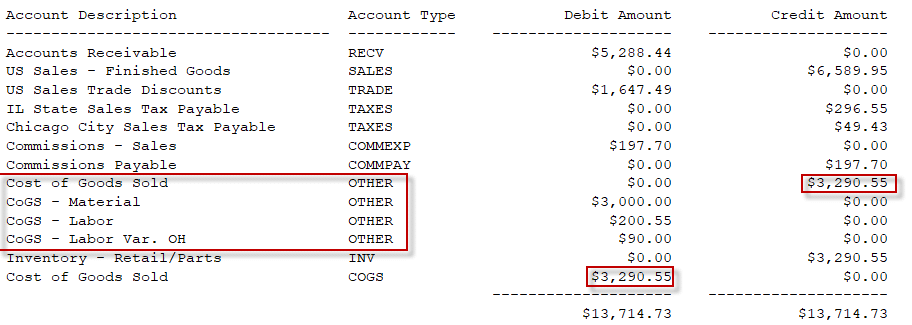
When a Sales Invoice posts, the new COGS Allocation routine will run to redistribute the SOP COGS amount into to detailed breakout recorded on the MO Receipt.
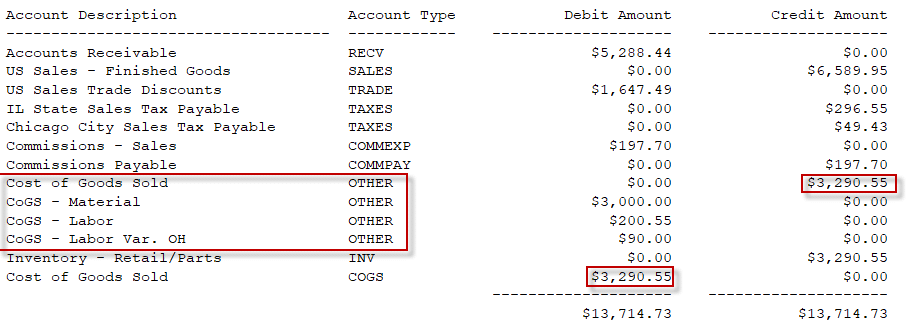
Note that in the screen capture above, the Account Type is OTHER because the Distributions window does not allow manually adding COGS distributions. When the COGS Allocation routine runs it will use the Account Type of COGS. Also, “SOP COGS” refers to the COGS account coming from either the Customer Maintenance or the Item Maintenance Accounts window.

The MO Receipt tracks costs in up to nine cost buckets, as shown below.
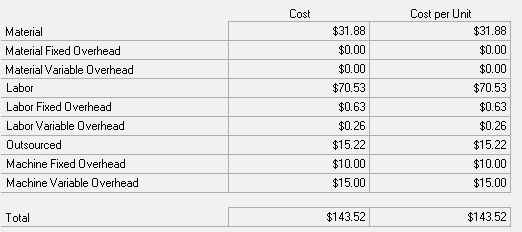
For each cost bucket on the MO Receipt where the dollar value is greater than $0, the COGS Allocation routine will:

  • Add a distribution to credit the SOP COGS account (if such distribution does not already exist)
  • Increase the SOP COGS credit amount by the Manufacturing Cost Amount
  • Add a distribution to debit the appropriate Manufacturing COGS Account from the Item’s Costing Accounts setup for the Manufacturing Cost Amount
  • Proceed to the next Manufacturing cost bucket

All distributions will be added with the Account Type of COGS.

In the event the item does not have a Manufacturing COGS Account, such as for Labor, but there is a Manufacturing Cost Amount in the bucket, the amount will NOT be allocated. It will remain in the SOP COGS account.

For information on this design, or any other WilloWare customization or product, please contact us:

www.willoware.com/contact-me/

WilloWare is now developing and creating products for BC D365!

Customization DS1142

COGS Allocation

Problem Definition:

ACME is a utility-scale manufacturer of tubular wind towers. They use GP Manufacturing in an actual cost environment. They record WIP Labor and actual material consumption. One MO produces one (and only one) serial-numbered tower.

Because inventory items are Actual Cost, GP does not track the individual costs (such as labor and material) that make up the finished good cost. When the item is sold and the Sale Invoice posts, GP credits Inventory for the total item cost, and debits COGS accordingly.
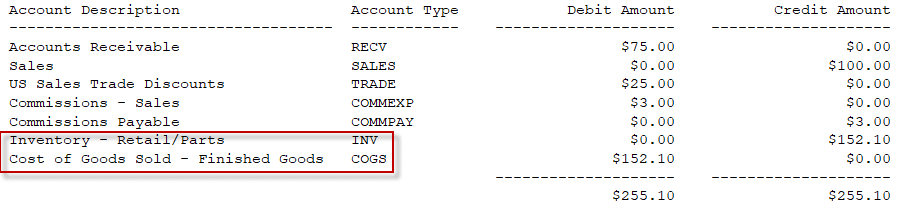
Note that the INV and COGS distributions are added at the moment of posting, because it is during posting when GP pulls inventory out of a specific FIFO layer, which allows it to determine the Actual Cost of the inventory being sold.

Because ACME serial numbers the finished goods, the Actual Cost is known as soon as a specific serial number is selected. Knowing the serial number also means that the Manufacturing Order which produced it can also be located, along with the actual material, labor and overhead costs that went in to the MO.

ACME would like to reallocate the COGS distribution to separate the total into the individual costs of Material, Labor and Labor Overhead.
Solution Overview:

During Sale Invoice Posting, additional posting accounts and distributions will be added to the transaction to reallocate the COGS amount into the individual cost buckets recorded on the Manufacturing Order.

Design Features:

Setup
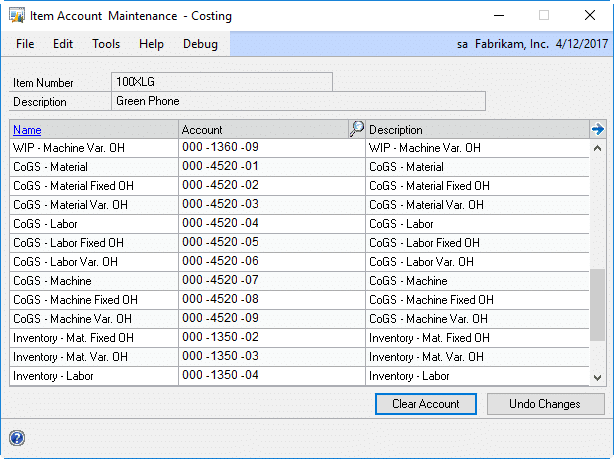
ACME will enter COGS accounts on the Item Account Maintenance- Costing window. The COGS Allocation described in the next section will only reallocate costs that have a matching GP Account in this window. For example, if only COGS-Material is present, the material cost from manufacturing will be subtracted from the IV COGS distribution and allocated to the COGS-Material account. Labor, Overhead, and any other costs will remain the in the IV COGS account.

COGS Allocation

When a Sales Invoice posts, the new COGS Allocation routine will run to redistribute the SOP COGS amount into to detailed breakout recorded on the MO Receipt.
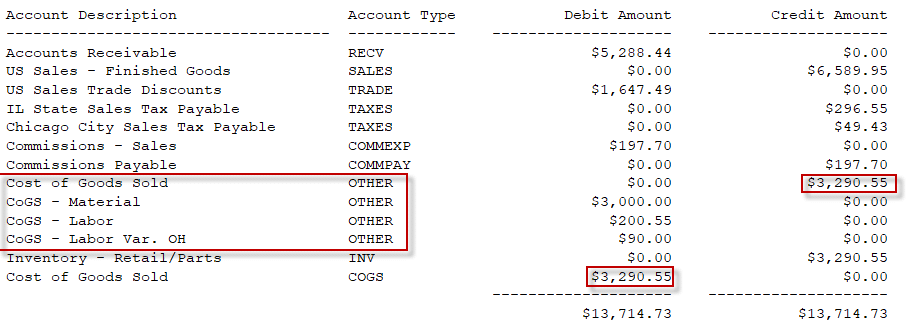
Note that in the screen capture above, the Account Type is OTHER because the Distributions window does not allow manually adding COGS distributions. When the COGS Allocation routine runs it will use the Account Type of COGS. Also, “SOP COGS” refers to the COGS account coming from either the Customer Maintenance or the Item Maintenance Accounts window.

The MO Receipt tracks costs in up to nine cost buckets, as shown below.
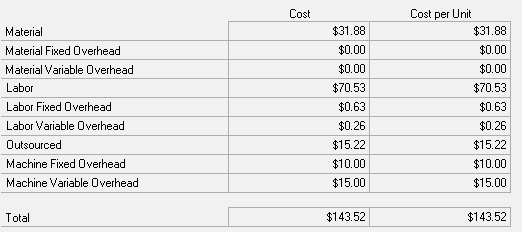
For each cost bucket on the MO Receipt where the dollar value is greater than $0, the COGS Allocation routine will:

  • Add a distribution to credit the SOP COGS account (if such distribution does not already exist)
  • Increase the SOP COGS credit amount by the Manufacturing Cost Amount
  • Add a distribution to debit the appropriate Manufacturing COGS Account from the Item’s Costing Accounts setup for the Manufacturing Cost Amount
  • Proceed to the next Manufacturing cost bucket

All distributions will be added with the Account Type of COGS.

In the event the item does not have a Manufacturing COGS Account, such as for Labor, but there is a Manufacturing Cost Amount in the bucket, the amount will NOT be allocated. It will remain in the SOP COGS account.

For information on this design, or any other WilloWare customization or product, please contact us:

www.willoware.com/contact-me/

WilloWare is now developing and creating products for BC D365!

 

Customization DS0253- Kits with Decimal Quantities

Customization DS0253

Kits with Decimal Quantities

Problem Definition:

ACME sells Aggregate and Ready Mix, and is using Kits. Inventory is sold in tons, but GP forces the Kit item to have zero quantity decimals. ACME needs to be able to sell fractional kits, such as ½ ton of Ready Mix.

Solution Overview:

The Item Maintenance window will be modified so that a Kit item can be created with Quantity Decimals greater than zero.

Design Features:

Item Maintenance Modification

The Item Maintenance window will be modified so that it allows Item Type = KIT and setting the Decimal Quantities field. The Unit of Measure schedule selected will also have to match the Item’s Decimal Quantities setting.

When an existing kit is retrieved, it will display the correct Decimal Quantities, and saving any changes will not cause the field to revert to zero Decimal Quantities.

Assumptions/Requirements:

Testing showed that Sales Transaction Entry will correctly calculate component quantities in a kit when the Kit item and all components had 2 quantity decimals. (All have the same quantity decimals.) This indicates that GP will accept this change and not generate errors elsewhere in the system. However, no functionality will be provided to ensure the quantity decimals match between the Kit item and the components, or account for other error conditions that could arise as a result of allowing the Decimal Quantities to be set.

It is assumed that the Decimal Quantities must match between the Kit item and the components.

Additional system changes can be estimated and added to this design.

WilloWare is now creating customizations and products for BC D365!
For information on this design, or any other WilloWare customization or product, please contact us:

www.willoware.com/contact-me/


MFG PowerPack 2026-03-25

Release Date:25-MAR-2026
GP Versions: 12/14/16/18
MFG PowerPack Build: 24.279
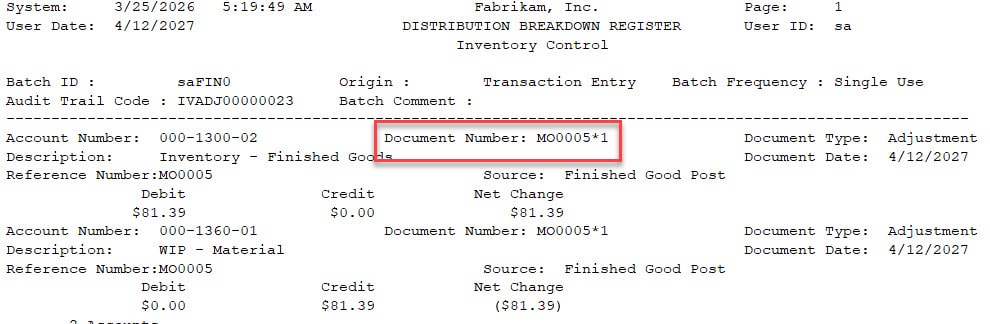
* Use MO # for IV Doc Number: Added coverage of IV Transactions created from MOP Component Transaction Entry in addition to MOP Receipt Entry.

This Tweak uses the MO Number to create the IV Document Number for Issues, Reverse Issues, and MO Receipt.  The format is:

“MO Number * Incrementing Number”

Such as MO0005*1 then MO0005*2 and so on.

MFG PowerPack 2026-03-12

Release Date:12-MAR-2026
GP Versions: 12/14/16/18
MFG PowerPack Build: 24.278
* Indented BOM Report: the report now calculates the EXTENDED component quantity. The Quantity field will now show extended quantity for each component rather than the BOM quantity.

VT1268- Create and Post Bank Transactions for RM Entry

Virtual Trigger VT1268

Create and Post Bank Transactions for RM Entry

Description of Need:

The Church of ACME has a customization that ties to their Parish website which shows the AR amount and Bank information. If they do an NSF of Void for a returned cash receipt in Dynamics GP, GP removes it from Bank Rec, which causes it to not also be removed from the Parish website.

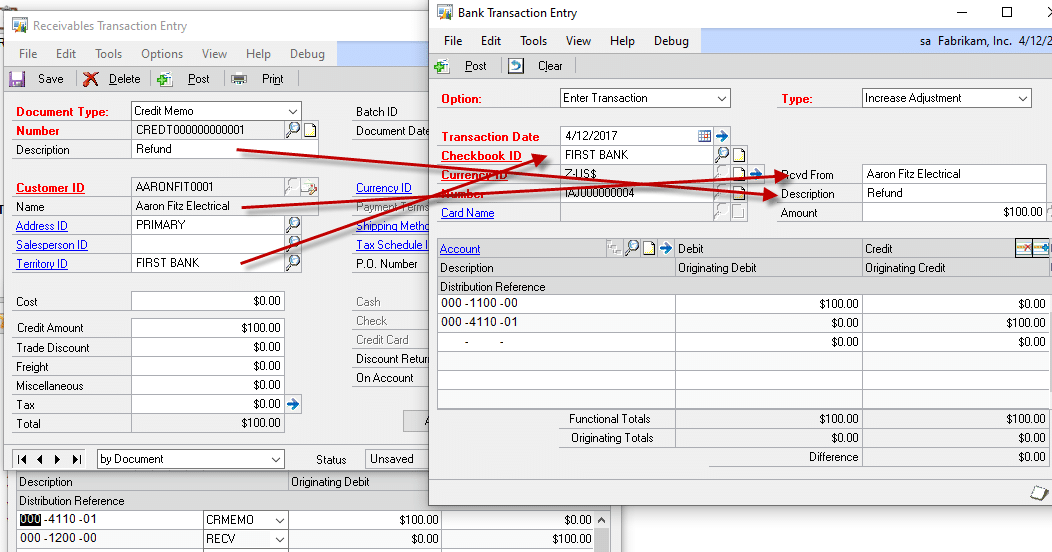
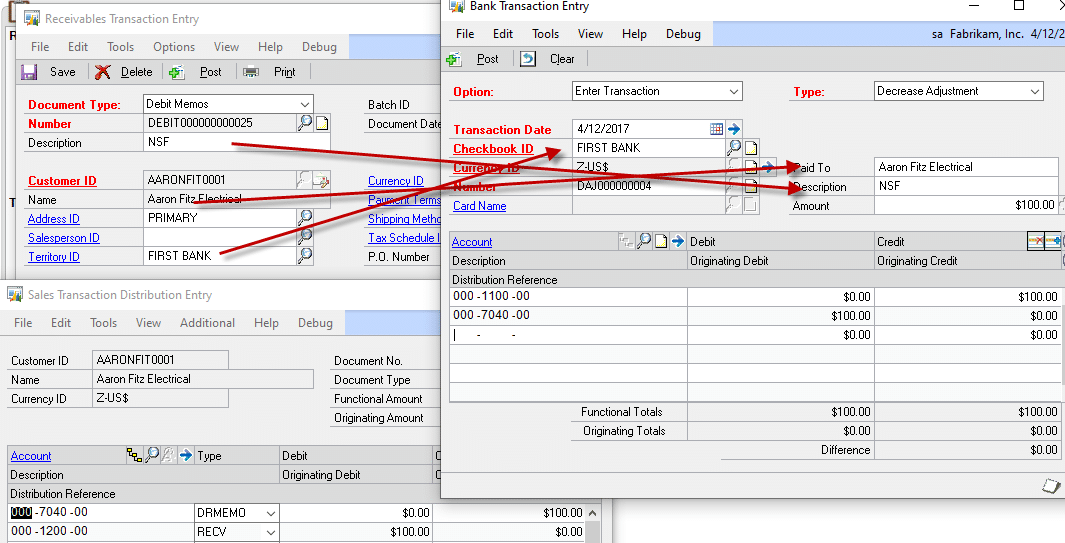
The work around they have developed is to create a Receivables Debit Memo, post it, and then create a “Decrease” Bank Transaction for the same amount. They would like to have the Bank Transaction be created and posted automatically when the Debit Memo is posted. This will be done using WilloWare’s Consulting Toolkit- Virtual Triggers module.

On the Debit Memo, they will enter a “Sales Territory” that matches a Checkbook ID (a Sales Territory ID will be created that exactly matches Checkbook IDs). Other field map as shown below:

A Credit Memo should be handled in a similar manner, but create an “Increase Adjustment” as shown below:

Description of Solution:

A Scriptlet will be created in WilloWare’s Virtual Triggers module that creates and posts a Decrease Bank Transaction for each Debit Memo posted. Debit Memos can be posted one at a time from the Receivables Transaction window, or in a Batch containing one or more Debit Memos.

The Scriptlet will only create Bank Transactions for Debit Memos and Credit Memos. Any other type of Receivables Transaction will NOT cause the Scriptlet to run.

This Virtual Trigger Scriptlet requires the purchase of WilloWare’s Consulting Toolkit Virtual Triggers module.

WilloWare is now developing for BC 365!
For information on this Scriptlet, or any other design or product in BC or GP, please contact us:

www.willoware.com/contact-me/

BC Tariff Management

Dynamics BC Tariff Management is a solution for automatically calculating and applying tariff and duty surcharges on sales orders in Microsoft Dynamics 365 Business Central. Tariff Management provides an extensive degree of configuration to suit your needs. A Tariff Code can be a user defined identifier, a country code or an HTS Code. Tariff and Duties can be calculated as percent of value (either cost or price) or a specific amount per weight.

Learn More…


MFG PowerPack 2026-02-18

Release Date:18-FEB-2026
GP Versions: 12/14/16/18
MFG PowerPack Build: 24.277
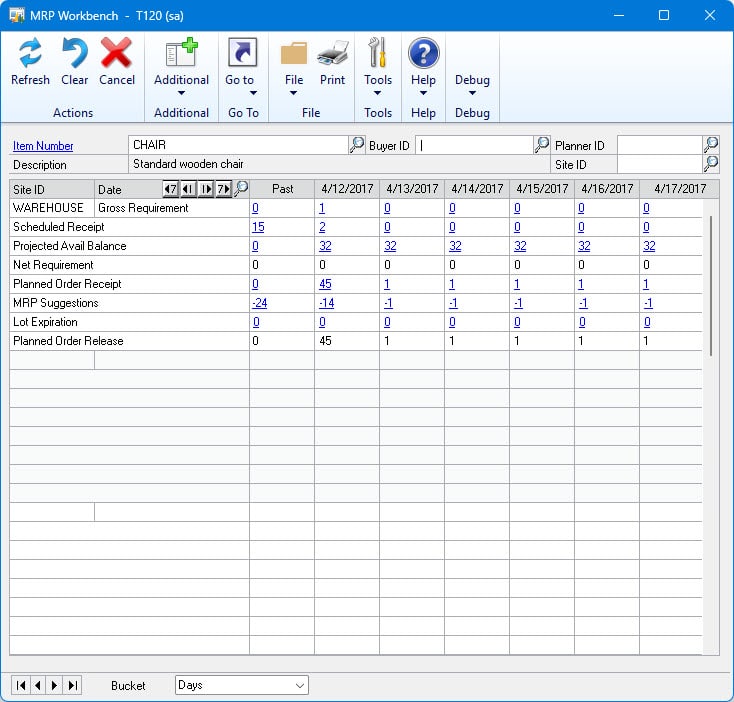
* BOM/MRP Alternates: Added new setup option for MRP Alternates to include QTY On Order in the “On Hand” value for the alternate. When enabled this will cause the MRP Alternates routine to use QTY On Order (i.e. POs) as if they are already received and on hand.

Customization CR1666- Change Item Standard Cost from Excel List

Customization CR1666

Change Item Standard Cost from Excel List

Description of Need:

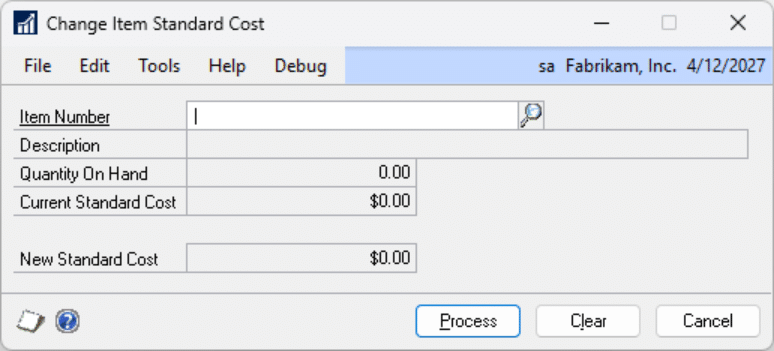
ACME does not use GP MFG, and can use the GP Change Item Standard Cost window to update an individual item standard cost. Doing so will update the item standard cost and post relevant GL adjustments for on hand inventory valuations.

ACME would like a utility to mass update item standard costs using an Excel spreadsheet as the source.

Description of Solution:

Navigation: Tools >> Utilities >> Inventory >> Change Item Standard Cost

A screenshot of a computer

AI-generated content may be incorrect.

The user will open the Change Item Standard Cost window and navigate to: Additional >> Update From Excel

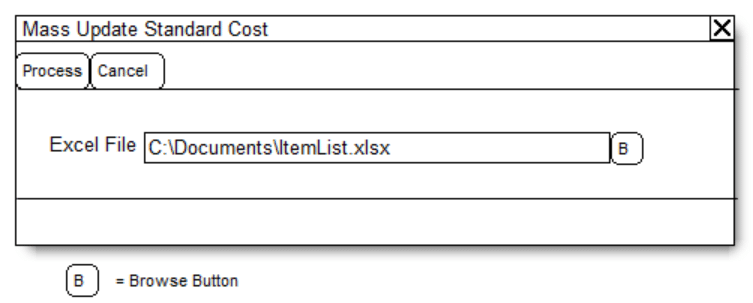
A screenshot of a computer

AI-generated content may be incorrect.

Field Function
Excel File Use the Browse button to select the Excel file to process. The Excel file must contain the following columns:

A = Item Number

B = New Current Cost

Row 1 will be read as a header row so the integration will begin on Row 2.

PROCESS Processes all of the lines of the spreadsheet. See below for details.

This and the Change Item Standard Cost window should remain open until the utility is complete or has been canceled by the user.

CANCEL Cancels the integration. The utility will finish processing the current item before cancelling.

Updating Item Standard Costs

The utility will first check to ensure that the utility can run. It will ensure that no other inventory utility such as reconcile is being run. If so, the user will be notified and cannot continue.

The utility will ensure that posting dates and permissions are set to ensure that the utility can execute. These checks are the same as when a single item is updated from the Change Item Standard Cost window.

Each item must pass the following validations in order to be updated. If the line does not pass then it will be added to the error log and skipped.

  1. Item Valuation Type is FIFO or LIFO Periodic.
  2. Item does not exist on an unposted PO Receipt or PO Invoice.

After passing the validations, the utility will change the standard cost of the item and automatically add it to a GL transaction to keep the inventory and GL in balance. A progress window will display during the process. When complete, a single GL transaction will be available to post.

Assumptions/Requirements:

  1. The functionality described above will not work with eConnect, any software that uses eConnect, or any software that directly writes to, updates, or deletes from SQL tables.
  2. The functionality described above is intended for the GP Desktop client.
  3. National Accounts functionality is NOT used.
  4. Advanced Distribution functionality is NOT used.
  5. Unless otherwise noted in this document, reporting is not included in this estimate.
  6. Unless otherwise noted in this document, Word Template functionality is not addressed.
  7. Unless otherwise noted in this document, the enhancement will not integrate with 3rd party products.  Some examples of 3rd party products would be:
  • An ISV plug-in product including WilloWare products
  • A dexterity customization designed by another developer
  • Dynamics GP Modules including, but not limited to:
  • Project Accounting
  • MDA
  • Analytical Accounting
  • Copy functionality found in SOP, POP and Inventory
  • Field Service
  • Extended Pricing
  • Manufacturing

Did you know that WilloWare is now developing customizations and products for Business Central?

For information on this design, Business Central, or other customizations and products, please contact us:

www.willoware.com/contact-me/

MFG PowerPack 2026-02-12

Release Date:12-FEB-2026
GP Versions: 12/14/16/18
MFG PowerPack Build: 24.276
* Scrap Accounts: The 18.2 build of GP included two new constants in the core product that overwrote our constants for LABOR and MACHINE. This in turn caused the Scrap Accounts window to be able to save those two GL accounts but not display them. This build uses new constants that have the correct values.

GPPowerPack 2026-02-02

Release Date: 2-FEB-2026
GP Versions: 12/14/16/18
GP PowerPack Build: 12.201
* NEW TWEAK: Edit Posted SOP UDF: provides the ability for selected users to edit the User Defined Fields and Tracking Numbers on posted sales transactions.

Tariff 2026-01-27

Release Date: 27-JAN-2026
GP Versions: 16/18
Tariff Build: 8.27
* Version Checking: Complete re-architecture of the process that checks for product updates. In addition to providing more flexibility in assigning who receives update notifications, these changes may also improve log-in time by reducing unnecessary web queries to retrieve current version information. Key changes: (1) The current build numbers for all products are retrieved at once and stored in the system database so it can be referenced by all installed WilloWare products without needing to retrieve per product. (2) A new Security Role called WILLOWAREUPDATES is created and all POWERUSERS are given the new role. This will allow removing users who do not need to see update notifications and adding additional users who should. The update notices were previously tied to SA, DYNSA and POWERUSER. (3) The notification window gives the user an option to snooze notifications for a new build by 1-week, 1-month or “Again” which pauses notifications until there is another new build. (4) The notification window gives users the ability to Opt Out, which removes the WILLOWAREUPDATES Role from their User ID.
* FULL PROCESS INSTALLATION REQUIRED: The updates are backwards compatible to all versions of GP from 2013 up.

Read more about the new Product Update Notifications here.

SpellCheck 2026-01-27

Release Date: 27-JAN-2026
GP Versions: 12/14/16/18
SpellCheck Build: 3.35
* Version Checking: Complete re-architecture of the process that checks for product updates. In addition to providing more flexibility in assigning who receives update notifications, these changes may also improve log-in time by reducing unnecessary web queries to retrieve current version information. Key changes: (1) The current build numbers for all products are retrieved at once and stored in the system database so it can be referenced by all installed WilloWare products without needing to retrieve per product. (2) A new Security Role called WILLOWAREUPDATES is created and all POWERUSERS are given the new role. This will allow removing users who do not need to see update notifications and adding additional users who should. The update notices were previously tied to SA, DYNSA and POWERUSER. (3) The notification window gives the user an option to snooze notifications for a new build by 1-week, 1-month or “Again” which pauses notifications until there is another new build. (4) The notification window gives users the ability to Opt Out, which removes the WILLOWAREUPDATES Role from their User ID.
* FULL PROCESS INSTALLATION REQUIRED: The updates are backwards compatible to all versions of GP from 2013 up.

Read more about the new Product Update Notifications here.

SOPPOP MultiLink 2026-01-27

Release Date: 27-JAN-2026
GP Versions: 12/14/16/18
SOPPOPMultiLink Build: 3.14
* Version Checking: Complete re-architecture of the process that checks for product updates. In addition to providing more flexibility in assigning who receives update notifications, these changes may also improve log-in time by reducing unnecessary web queries to retrieve current version information. Key changes: (1) The current build numbers for all products are retrieved at once and stored in the system database so it can be referenced by all installed WilloWare products without needing to retrieve per product. (2) A new Security Role called WILLOWAREUPDATES is created and all POWERUSERS are given the new role. This will allow removing users who do not need to see update notifications and adding additional users who should. The update notices were previously tied to SA, DYNSA and POWERUSER. (3) The notification window gives the user an option to snooze notifications for a new build by 1-week, 1-month or “Again” which pauses notifications until there is another new build. (4) The notification window gives users the ability to Opt Out, which removes the WILLOWAREUPDATES Role from their User ID.
* FULL PROCESS INSTALLATION REQUIRED: The updates are backwards compatible to all versions of GP from 2013 up.

Read more about the new Product Update Notifications here.

Preactor Integration 2026-01-27

Release Date: 27-JAN-2026
GP Versions: 12/14/16/18
Preactor Integration Build: 2.23
* Version Checking: Complete re-architecture of the process that checks for product updates. In addition to providing more flexibility in assigning who receives update notifications, these changes may also improve log-in time by reducing unnecessary web queries to retrieve current version information. Key changes: (1) The current build numbers for all products are retrieved at once and stored in the system database so it can be referenced by all installed WilloWare products without needing to retrieve per product. (2) A new Security Role called WILLOWAREUPDATES is created and all POWERUSERS are given the new role. This will allow removing users who do not need to see update notifications and adding additional users who should. The update notices were previously tied to SA, DYNSA and POWERUSER. (3) The notification window gives the user an option to snooze notifications for a new build by 1-week, 1-month or “Again” which pauses notifications until there is another new build. (4) The notification window gives users the ability to Opt Out, which removes the WILLOWAREUPDATES Role from their User ID.
* FULL PROCESS INSTALLATION REQUIRED: The updates are backwards compatible to all versions of GP from 2013 up.

Read more about the new Product Update Notifications here.

MOGenerator 2026-01-27

Release Date:27-JAN-2026
GP Versions: 12/14/16/18
MOGenerator Build: 13.155
* Version Checking: Complete re-architecture of the process that checks for product updates. In addition to providing more flexibility in assigning who receives update notifications, these changes may also improve log-in time by reducing unnecessary web queries to retrieve current version information. Key changes: (1) The current build numbers for all products are retrieved at once and stored in the system database so it can be referenced by all installed WilloWare products without needing to retrieve per product. (2) A new Security Role called WILLOWAREUPDATES is created and all POWERUSERS are given the new role. This will allow removing users who do not need to see update notifications and adding additional users who should. The update notices were previously tied to SA, DYNSA and POWERUSER. (3) The notification window gives the user an option to snooze notifications for a new build by 1-week, 1-month or “Again” which pauses notifications until there is another new build. (4) The notification window gives users the ability to Opt Out, which removes the WILLOWAREUPDATES Role from their User ID.
* FULL PROCESS INSTALLATION REQUIRED: The updates are backwards compatible to all versions of GP from 2013 up.

Read more about the new Product Update Notifications here.

LeanMFG 2026-01-27

Release Date: 27-JAN-2026
GP Versions: 12/14/16/18
LeanMFG Build: 7.79
* Version Checking: Complete re-architecture of the process that checks for product updates. In addition to providing more flexibility in assigning who receives update notifications, these changes may also improve log-in time by reducing unnecessary web queries to retrieve current version information. Key changes: (1) The current build numbers for all products are retrieved at once and stored in the system database so it can be referenced by all installed WilloWare products without needing to retrieve per product. (2) A new Security Role called WILLOWAREUPDATES is created and all POWERUSERS are given the new role. This will allow removing users who do not need to see update notifications and adding additional users who should. The update notices were previously tied to SA, DYNSA and POWERUSER. (3) The notification window gives the user an option to snooze notifications for a new build by 1-week, 1-month or “Again” which pauses notifications until there is another new build. (4) The notification window gives users the ability to Opt Out, which removes the WILLOWAREUPDATES Role from their User ID.
* FULL PROCESS INSTALLATION REQUIRED: The updates are backwards compatible to all versions of GP from 2013 up.

Read more about the new Product Update Notifications here.

Item Process Tracking (IPT) 2026-01-27

Release Date: 27-JAN-2026
GP Versions: 12/14/16/18
IPT Build: 4.24
* Version Checking: Complete re-architecture of the process that checks for product updates. In addition to providing more flexibility in assigning who receives update notifications, these changes may also improve log-in time by reducing unnecessary web queries to retrieve current version information. Key changes: (1) The current build numbers for all products are retrieved at once and stored in the system database so it can be referenced by all installed WilloWare products without needing to retrieve per product. (2) A new Security Role called WILLOWAREUPDATES is created and all POWERUSERS are given the new role. This will allow removing users who do not need to see update notifications and adding additional users who should. The update notices were previously tied to SA, DYNSA and POWERUSER. (3) The notification window gives the user an option to snooze notifications for a new build by 1-week, 1-month or “Again” which pauses notifications until there is another new build. (4) The notification window gives users the ability to Opt Out, which removes the WILLOWAREUPDATES Role from their User ID.
* FULL PROCESS INSTALLATION REQUIRED: The updates are backwards compatible to all versions of GP from 2013 up.

Read more about the new Product Update Notifications here.

EZImport 2026-01-26

Release Date: 26-JAN-2026
GP Versions: 12/14/16/18
EZImport Build: 3.22
* Version Checking: Complete re-architecture of the process that checks for product updates. In addition to providing more flexibility in assigning who receives update notifications, these changes may also improve log-in time by reducing unnecessary web queries to retrieve current version information. Key changes: (1) The current build numbers for all products are retrieved at once and stored in the system database so it can be referenced by all installed WilloWare products without needing to retrieve per product. (2) A new Security Role called WILLOWAREUPDATES is created and all POWERUSERS are given the new role. This will allow removing users who do not need to see update notifications and adding additional users who should. The update notices were previously tied to SA, DYNSA and POWERUSER. (3) The notification window gives the user an option to snooze notifications for a new build by 1-week, 1-month or “Again” which pauses notifications until there is another new build. (4) The notification window gives users the ability to Opt Out, which removes the WILLOWAREUPDATES Role from their User ID.
* FULL PROCESS INSTALLATION REQUIRED: The updates are backwards compatible to all versions of GP from 2013 up.

Read more about the new Product Update Notifications here.

Blanket PO 2026-01-26

Release Date: 26-JAN-2026
GP Versions: 12/14/16/18
BlanketPO Build: 3.47
* Version Checking: Complete re-architecture of the process that checks for product updates. In addition to providing more flexibility in assigning who receives update notifications, these changes may also improve log-in time by reducing unnecessary web queries to retrieve current version information. Key changes: (1) The current build numbers for all products are retrieved at once and stored in the system database so it can be referenced by all installed WilloWare products without needing to retrieve per product. (2) A new Security Role called WILLOWAREUPDATES is created and all POWERUSERS are given the new role. This will allow removing users who do not need to see update notifications and adding additional users who should. The update notices were previously tied to SA, DYNSA and POWERUSER. (3) The notification window gives the user an option to snooze notifications for a new build by 1-week, 1-month or “Again” which pauses notifications until there is another new build. (4) The notification window gives users the ability to Opt Out, which removes the WILLOWAREUPDATES Role from their User ID.
* FULL PROCESS INSTALLATION REQUIRED: The updates are backwards compatible to all versions of GP from 2013 up.

Read more about the new Product Update Notifications here.

Engineer To Order (ETO) 2026-01-26

Release Date: 26-JAN-2026
GP Versions: 12/14/16/18
ETO Build: 4.48
* Version Checking: Complete re-architecture of the process that checks for product updates. In addition to providing more flexibility in assigning who receives update notifications, these changes may also improve log-in time by reducing unnecessary web queries to retrieve current version information. Key changes: (1) The current build numbers for all products are retrieved at once and stored in the system database so it can be referenced by all installed WilloWare products without needing to retrieve per product. (2) A new Security Role called WILLOWAREUPDATES is created and all POWERUSERS are given the new role. This will allow removing users who do not need to see update notifications and adding additional users who should. The update notices were previously tied to SA, DYNSA and POWERUSER. (3) The notification window gives the user an option to snooze notifications for a new build by 1-week, 1-month or “Again” which pauses notifications until there is another new build. (4) The notification window gives users the ability to Opt Out, which removes the WILLOWAREUPDATES Role from their User ID.
* FULL PROCESS INSTALLATION REQUIRED: The updates are backwards compatible to all versions of GP from 2013 up.

Read more about the new Product Update Notifications here.

Customization DS1238: PO Invoice Non-IV Item Lookup

Customization DS1238

PO Invoice Non-IV Item Lookup

Problem Definition:

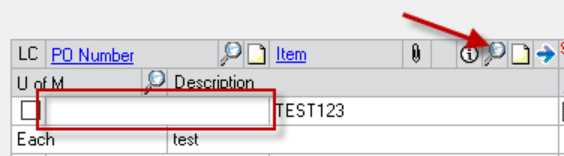
ACME imports PO Receipts (Shipments) without a Purchase Order. The PO Receipts are for non-inventory items. When they enter the PO Invoice, because there is not a Purchase Order, the Receipts are not available in the Auto-Invoice window. The Item Lookup on the main PO invoice window does not have an option to display the non-inventory items from the receipts, so users must manually key in the Item Number, Quantity, Cost, etc. to enter the invoice.

ACME would like to search from the PO Invoice Entry window and look up non-inventory items that have been received that have an un-invoiced (unmatched) quantity and be able to select an item from the lookup.

Design Features:

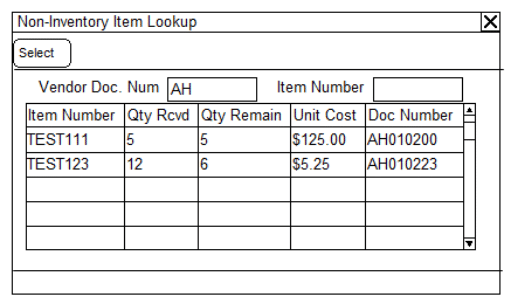
On the Purchasing Invoice Entry window, if the PO Number field is blank and user clicks the Item Number Lookup button, the Non-Inventory Item Lookup will open instead of the regular Item Number Lookup.

The Non-IV Item Lookup will show non-inventory Items from posted PO Receipts that have an un-invoiced quantity.

Field Function
Vendor Doc Num Enter a Vendor Document Number, or portion thereof, then tab out of the field to perform a “Contains” search on the Doc Number column. Clear the field to refresh the display to show all Items.
Item Number Enter an Item Number, or portion thereof, then tab out of the field to perform a “Contains” search on the Item Number column.
Qty Rdvd Shows the Quantity Received
Qty Remain Shows the Quantity Remaining to be Invoiced
Unit Cost Shows the Unit Cost from the PO Receipt
Doc Number Shows the Vendor Document Number from the PO Receipt
Item Description Not shown above. A second line in the scrolling window will show the Item Description from the PO Receipt Line.

Select an Item by double clicking on it, or by clicking the SELECT button.

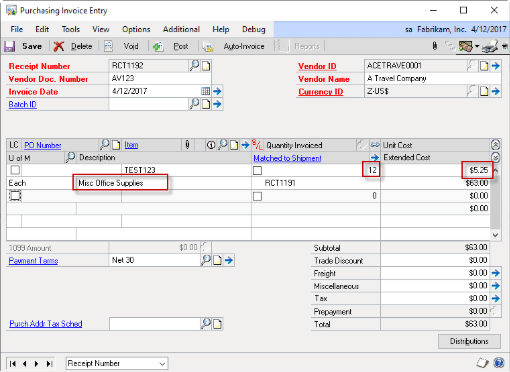
Selecting an Item from the Non-IV Item Lookup will populate:

  • Item Number
  • Quantity Invoiced (set to Quantity Remain)
  • Unit Cost
  • Description

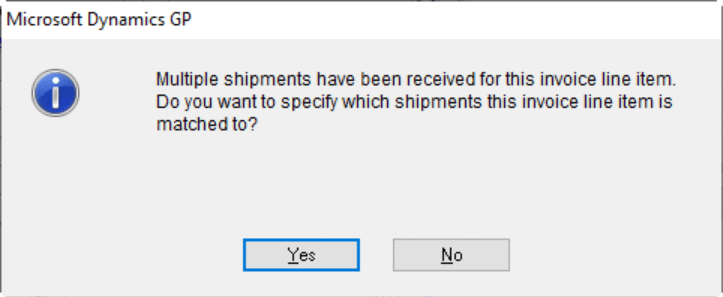
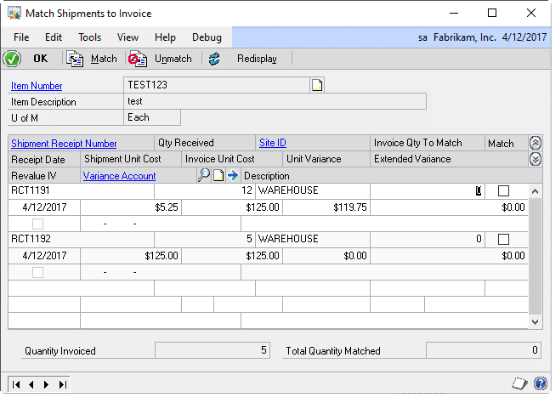
The PO Invoice Entry window automatically finds the “Matched to Shipment” document number when you tab out of the line. However, if there are multiple receipts of the same Non-Inventory Item Number that have un-invoiced quantities, GP will present the dialog box below:

Clicking YES opens the Match Shipments to Invoice window. The user will need to select the correct Receipt and click OK.

Assumptions/Requirements:

The functionality described above will not work with eConnect, any software that uses eConnect, or any software that directly writes to, updates, or deletes from SQL tables.

For Information on this design, or any other WilloWare customization or product, please contact us:

www.willoware.com/contact-me/

LabelLink 2026-01-26

Release Date: 26-JAN-2026
GP Versions: 12/14/16/18
LabelLink Build: 4.50
* Version Checking: Complete re-architecture of the process that checks for product updates. In addition to providing more flexibility in assigning who receives update notifications, these changes may also improve log-in time by reducing unnecessary web queries to retrieve current version information. Key changes: (1) The current build numbers for all products are retrieved at once and stored in the system database so it can be referenced by all installed WilloWare products without needing to retrieve per product. (2) A new Security Role called WILLOWAREUPDATES is created and all POWERUSERS are given the new role. This will allow removing users who do not need to see update notifications and adding additional users who should. The update notices were previously tied to SA, DYNSA and POWERUSER. (3) The notification window gives the user an option to snooze notifications for a new build by 1-week, 1-month or “Again” which pauses notifications until there is another new build. (4) The notification window gives users the ability to Opt Out, which removes the WILLOWAREUPDATES Role from their User ID.
* FULL PROCESS INSTALLATION REQUIRED: The updates are backwards compatible to all versions of GP from 2013 up.

Read more about the new Product Update Notifications here.

Consulting Toolkit 2026-01-26

Release Date: 26-JAN-2026
GP Versions: 12/14/16/18
CTK Build: 4.38
* Version Checking: Complete re-architecture of the process that checks for product updates. In addition to providing more flexibility in assigning who receives update notifications, these changes may also improve log-in time by reducing unnecessary web queries to retrieve current version information. Key changes: (1) The current build numbers for all products are retrieved at once and stored in the system database so it can be referenced by all installed WilloWare products without needing to retrieve per product. (2) A new Security Role called WILLOWAREUPDATES is created and all POWERUSERS are given the new role. This will allow removing users who do not need to see update notifications and adding additional users who should. The update notices were previously tied to SA, DYNSA and POWERUSER. (3) The notification window gives the user an option to snooze notifications for a new build by 1-week, 1-month or “Again” which pauses notifications until there is another new build. (4) The notification window gives users the ability to Opt Out, which removes the WILLOWAREUPDATES Role from their User ID.
* FULL PROCESS INSTALLATION REQUIRED: The updates are backwards compatible to all versions of GP from 2013 up.

Read more about the new Product Update Notifications here.

CompleteCount 2026-01-25

Release Date: 25-JAN-2026
GP Versions: 12/14/16/18
CompleteCount Build: 6.68
* Version Checking: Complete re-architecture of the process that checks for product updates. In addition to providing more flexibility in assigning who receives update notifications, these changes may also improve log-in time by reducing unnecessary web queries to retrieve current version information. Key changes: (1) The current build numbers for all products are retrieved at once and stored in the system database so it can be referenced by all installed WilloWare products without needing to retrieve per product. (2) A new Security Role called WILLOWAREUPDATES is created and all POWERUSERS are given the new role. This will allow removing users who do not need to see update notifications and adding additional users who should. The update notices were previously tied to SA, DYNSA and POWERUSER. (3) The notification window gives the user an option to snooze notifications for a new build by 1-week, 1-month or “Again” which pauses notifications until there is another new build. (4) The notification window gives users the ability to Opt Out, which removes the WILLOWAREUPDATES Role from their User ID.
* FULL PROCESS INSTALLATION REQUIRED: The updates are backwards compatible to all versions of GP from 2013 up.

Read more about the new Product Update Notifications here.

MFG Data Archive 2026-01-25

Release: 25-JAN-2026
GP Versions: 12/14/16/18
MFGDA Build: 4.37
* Version Checking: Complete re-architecture of the process that checks for product updates. In addition to providing more flexibility in assigning who receives update notifications, these changes may also improve log-in time by reducing unnecessary web queries to retrieve current version information. Key changes: (1) The current build numbers for all products are retrieved at once and stored in the system database so it can be referenced by all installed WilloWare products without needing to retrieve per product. (2) A new Security Role called WILLOWAREUPDATES is created and all POWERUSERS are given the new role. This will allow removing users who do not need to see update notifications and adding additional users who should. The update notices were previously tied to SA, DYNSA and POWERUSER. (3) The notification window gives the user an option to snooze notifications for a new build by 1-week, 1-month or “Again” which pauses notifications until there is another new build. (4) The notification window gives users the ability to Opt Out, which removes the WILLOWAREUPDATES Role from their User ID.
* FULL PROCESS INSTALLATION REQUIRED: The updates are backwards compatible to all versions of GP from 2013 up.

Read more about the new Product Update Notifications here.

MFG Import 2026-01-25

Release Date: 25-JAN-2026
GP Versions: 12/14/16/18
MFG Import Build: 7.82
* Version Checking: Complete re-architecture of the process that checks for product updates. In addition to providing more flexibility in assigning who receives update notifications, these changes may also improve log-in time by reducing unnecessary web queries to retrieve current version information. Key changes: (1) The current build numbers for all products are retrieved at once and stored in the system database so it can be referenced by all installed WilloWare products without needing to retrieve per product. (2) A new Security Role called WILLOWAREUPDATES is created and all POWERUSERS are given the new role. This will allow removing users who do not need to see update notifications and adding additional users who should. The update notices were previously tied to SA, DYNSA and POWERUSER. (3) The notification window gives the user an option to snooze notifications for a new build by 1-week, 1-month or “Again” which pauses notifications until there is another new build. (4) The notification window gives users the ability to Opt Out, which removes the WILLOWAREUPDATES Role from their User ID.
* FULL PROCESS INSTALLATION REQUIRED: The updates are backwards compatible to all versions of GP from 2013 up.

Read more about the new Product Update Notifications here.

GPPowerPack 2026-01-24

Release Date: 24-JAN-2026
GP Versions: 12/14/16/18
GP PowerPack Build: 12.200
* Version Checking: Complete re-architecture of the process that checks for product updates. In addition to providing more flexbility in assigning who receives update notifications, these changes may also improve log-in time by reducing unnecessary web queries to retrieve current version information. Key changes: (1) The current build numbers for all products are retrieved at once and stored in the system database so it can be referenced by all installed WilloWare products without needing to retrieve per product. (2) A new Security Role called WILLOWAREUPDATES is created and all POWERUSERS are given the new role. This will allow removing users who do not need to see update notifications and adding additional users who should. The update notices were previously tied to SA, DYNSA and POWERUSER. (3) The notification window gives the user an option to snooze notifications for a new build by 1-week, 1-month or “Again” which pauses notifications until there is another new build. (4) The notification window gives users the ability to Opt Out, which removes the WILLOWAREUPDATES Role from their User ID.
* FULL PROCESS INSTALLATION REQUIRED: The updates are backwards compatible to all versions of GP from 2013 up.

Read more about the new Product Update Notifications here.

MFGPowerPack 2026-01-24

Release Date:24-JAN-2026
GP Versions: 12/14/16/18
MFG PowerPack Build: 24.275
* Version Checking: Complete re-architecture of the process that checks for product updates. In addition to providing more flexibility in assigning who receives update notifications, these changes may also improve log-in time by reducing unnecessary web queries to retrieve current version information. Key changes: (1) The current build numbers for all products are retrieved at once and stored in the system database so it can be referenced by all installed WilloWare products without needing to retrieve per product. (2) A new Security Role called WILLOWAREUPDATES is created and all POWERUSERS are given the new role. This will allow removing users who do not need to see update notifications and adding additional users who should. The update notices were previously tied to SA, DYNSA and POWERUSER. (3) The notification window gives the user an option to snooze notifications for a new build by 1-week, 1-month or “Again” which pauses notifications until there is another new build. (4) The notification window gives users the ability to Opt Out, which removes the WILLOWAREUPDATES Role from their User ID.
* FULL PROCESS INSTALLATION REQUIRED: The updates are backwards compatible to all versions of GP from 2013 up.

Read more about the new Product Update Notifications here.

GPPowerPack 2026-01-22

Release Date: 22-JAN-2026
GP Versions: 12/14/16/18
GP PowerPack Build: 11.199
* SOP Rules: User ID – Location Default: fixed issue where the Default Site would change on an existing document to the Site assigned to the current user (not the one who created the document) when the user opened the Customer Detail Entry window and then returned to the Sales Transaction Entry window. This SOP Rule will use the “User 2 Enter” assigned to the transaction rather than the currently logged in User ID.

MFGPowerPack 2026-01-21

Release Date:21-JAN-2026
GP Versions: 12/14/16/18
MFG PowerPack Build: 22.273
* NEW TWEAK – MRP Site Exclusions. Exclude specific sites from the MRP Work Bench window, including the Total Site record, so you can focus on only the sites you work with rather than all sites included in MRP.
* FULL PROCESS INSTALLATION REQUIRED: The updates are backwards compatible to all versions of GP from 2013 up.

Use MRP Site Exclusions to make the MRP Work Bench window focus on only the site or sites you need to work with.  Remove the distraction of other sites that are included in planning and the Total Site.


Customization DS1307- Update PPV for TAX Lines

Customization DS1307

Update PPV for TAX Lines

Problem Definition:

ACME needs a way to update their distributions for a non-inventory line on a PO Invoice. The line would have the word “TAX” in it and would be for $0.00. They need a way to update their distributions.

Step 1- No custom needed on this step. A PO is imported from ReqLogic:

Step 2- No custom needed on this step. A PO Receipt for that above PO is imported from ReqLogic:

Here are the SAMPLE distributions:

Step 3- They receive the Invoice from the Vendor. The Vendor does NOT charge them for the Tax. They pass through the Invoice from ReqLogic. It looks like this:

With these SAMPLE distributions:

CUSTOM REQUIREMENT: ACME needs a custom button that would do the following to the distributions:

  1. Change the PPV account to GP Account CORP11-3410. This is their Use Tax Owed Account.
  2. Update the Distribution Reference with a value such as the original PO Number.

Design Features:

Update PPV

The PO Invoice is imported from ReqLogic. The invoice will already be imported with the TAX line(s) set to $0, and the incorrect default PPV will already be set in the Distribution Entry window.

A new Additional menu option will be added to the Purchasing Invoice Distribution Entry window called Update PPV. Clicking Update PPV will open the Update PPV window.

FIELD FUNCTION
UPDATE Clicking Update will update the PPV account numbers assigned to the TAX lines, add the Distribution Reference, and refresh the Distribution Entry window.
CANCEL Closes the window without making any changes.
Account Number Enter or select the account number to use. This field will default to CORP11-3210, but if necessary, can be changed.
Distribution Reference Enter the value to use on the distribution line of this account number.

For information on this design, or any other WilloWare customization or product, please contact us:

www.willoware.com/contact-me/


MFGPowerPack 2026-01-08

Release Date:7-JAN-2026
GP Versions: 12/14/16/18
MFG PowerPack Build: 21.272
* NEW TWEAK – MO Lookup-Save Settings. This tweak saves the MO Lookup setting (Find By, MO Status, Outsourcing) on a per user basis and reapplies the last used settings the next time the MO Lookup is opened.
* PowerATP: added Additional Menus to Component Transaction Entry, Edit MO Status, Picklist (MO Picklist), Picklist Shortages Inquiry
* Capable To Promise (CTP): fixed issue caused by the bin exclusion changes that prevented drill-down into subassemblies.

The new MO Lookup tweak saves the dropdown box settings on the Manufacturing Order Lookup window and re-applies them the next time the window is opened.

Unable To Execute File In The Temporary Directory

Here’s a quick resolution to an unusual error you could encounter installing software on Windows.

“Unable to execute file in the temporary directory.  Setup Aborted.

Error 5: Access is denied.”

The domain security is preventing running the installer because it is trying to put files into the “user temp” folder.  If security cannot be changed, the quick fix is as follows:

You must be the only user logged into the machine.

In the Windows Search box type “advanced”.  Select “View advanced system settings”.

Click Environment Variables:

Note the paths for the TEMP and TMP folders (copy this and save it).

Use Windows Explorer to create a new folder.  This can be on the desktop, or off the C: drive such as C:\TEMP.  The name of the folder does not need to be TEMP.

Select each path, click EDIT and change the path to your new folder.  Click OK to save and close all windows.

Re-run the installer.

When done, change the path back to the default.

MFG PowerPack BOM Bins

Price $2400 Manual

Dynamics GP with multi-bins provides the ability to record one Default Material Issue Bin at the Item-Site level. There are many circumstances where this single bin is not sufficient to meet real world inventory management requirements. The BOM Bins module provides the ability to record a Default Material Issue bin for a Component within a specific BOM. When a BOM Component Bin is specified, Manufacturing will use that bin to Allocate and Backflush, otherwise it will use the normal Item-Site Default Material Issue Bin.

BOM Bins also adds “MO Bins” to allow providing a Material Issue Bin and MO Receipt Bin on the MO.

Specify an Issue Bin at the Component-level on a Bill of Materials.  The same component used on different BOMs can be issued from different bins.

A screenshot of a computer AI-generated content may be incorrect.

MO Bins provide the ability to specify an Issue Bin and Receipt Bin specific to the MO. This can be used together with BOM Bins or by itself. The Issue Bin must be valid for the Issue From site on every line on the Picklist.

If BOM Bins and MO Bins are both used the bin selection logic will be:

  • Use BOM Bin if present
  • Use MO Bin if present
  • Use Item-Site Material Issue Bin

A screenshot of a computer AI-generated content may be incorrect.

The bin selection logic can be further customized to support your business rules by modifying a SQL stored procedure.


GPPowerPack 2025-12-16

Release Date: 16-DEC-2025
GP Versions: 12/14/16/18
GP PowerPack Build: 11.198
* NEW TWEAK: PM Check Date Default- Defaults the Check Date to the Next Business Day (based on User Date) and moves it forward to the first business day if “tomorrow” falls on a holiday. The date logic is supported by the new GP Business Calendar.
* NEW GP Business Calendar: Adds the ability to create an maintain an unlimited number of named calendars, such as for tracking US and CAN holidays. A stored procedure (wspGetNextBusinessDay) contains the logic to move a given date to the next available day, and this can be modified on-site to provide your own business logic available to other customizations and applications.
* THIS RELEASE REQUIRES THE FULL INSTALLATION PROCESS TO CREATE NEW SQL OBJECTS.

MFGPowerPack 2025-12-05

Release Date:5-DEC-2025
GP Versions: 12/14/16/18
MFG PowerPack Build: 21.271
* Capable To Promise (CTP): Added support for bin exclusions when multi-bin is enabled. The CTP Sites window has been changed to allow entering one or more bins to EXCLUDE from the calculation (i.e. rework, QA/QC).
* FULL PROCESS INSTALLATION REQUIRED: The updates are backwards compatible to all versions of GP from 2013 up.


Customization DS1510: Coupa-GP Apply PM Credits

Customization DS1510

Coupa-GP Apply PM Credits

Problem Definition:

ACME is implementing Coupa’s Spend Management software, with an integration into Dynamics GP.

The SmartConnect integration creates and posts PM Credits in GP, and also PM Invoices and Payments and applies the payments to the invoices. Applying open payments to open invoices is done during the integration through a product from Precipio. However, because the Credit documents may be created and posted well in advance of the Invoice, the Precipio software cannot apply the posted documents.

ACME needs a way to automate applying posted PM Credits to Invoices.

A SQL view will be created that provides the following information from Coupa:

  • Credit Document Number
  • Amount to Apply
  • PM Invoice Document Number

All validation will occur in Coupa/SQL so that the view contains only documents that can be applied to each other and valid amounts.

ACME has Multi-Currency turned on, but only use USD. They use Taxes and Payment Terms. The Payment Terms ID assigned to integrated documents will have settings in GP that mirror those in Coupa, so that GP will calculate the correct Terms Discount. When documents are applied it is assumed that terms discounts will always be taken if applicable.

Solution Overview:

WilloWare will create an enhancement for Dynamics GP that will run automatically once per day to apply PM Credits to Invoices using the information provided from Coupa.

Design Features:

Setup

Navigation: Tools >> Setup >> Company >> Auto-Apply Credits Setup

A screenshot of a computer screen

Description automatically generated

This window is used to specify users whose log-in activity will trigger the AutoApply PM Credits utility to run. Users in this window will also have the ability to run the utility manually.

Field Function
User ID Enter a GP User ID or select one from the lookup. To ensure that users have the necessary permissions to apply payables documents, users added to this list should have GP security to use the Apply Payables Documents window.
User Name Displays the GP User Name

AutoApply PM Credits

Navigation: Transactions >> Purchasing >> AutoApply Credits

Table

Description automatically generated

NOTE: Using the window to manually run the AutoApply routine is NOT required. The AutoApply process described below will run automatically when one of the users specified in Setup logs in to GP.

Field Function
Credit Doc Shows the GP Voucher Number of the PM Credit
Apply Amount Shows the amount from the PM Credit to be applied
Apply to Doc Shows the GP Voucher Number of the PM Invoice to which the Credit will be applied
REFRESH Redisplays the window
PROCESS Runs the AutoApply routine described below

The window (and routine below) will run based on documents in a SQL View. The view will be created so that it shows only documents that can be (and need to be) applied to each other.

View Name: wvPMApply

Columns:

  • VENDORID (Vendor ID)
  • VENDNAME (Vendor Name)
  • APFVCHNM (Apply From Vendor Number)
  • APFRMAPLYAMT (Apply From Apply Amount)
  • APTVCHNM (Apply To Voucher Number

NOTE: The column names must match the CAPITALIZED column names listed above.

AutoApply Routine

When one of the “auto apply” users logs in to GP, it will trigger the AutoApply routine to run. It can also be run manually at any time by clicking the PROCESS button.

When run automatically during log-in, if there are credits that need to be applied, the user will be asked:

Coupa PM Credits need to be applied. Do you want to do this now?

If the user answers NO, the process will be skipped until the next log-in, or the routine is run manually.

Using the information provided in the SQL VIEW, documents will be applied to each other one at a time. This process will have the same effect as if they were manually applied in the Apply Payables Documents window.

A progress window will open during the process to show users information about the process.

Assumptions/Requirements:

  1. The functionality described above will not work with eConnect, any software that uses eConnect, or any software that directly writes to, updates, or deletes from SQL tables.
  2. The functionality described above is intended for the GP Desktop client.
  3. National Accounts functionality is NOT used.
  4. Advanced Distribution functionality is NOT used.
  5. Unless otherwise noted in this document, reporting is not included in this estimate.
  6. Unless otherwise noted in this document, Word Template functionality is not addressed.
  7. Unless otherwise noted in this document, the enhancement will not integrate with 3rd party products. Some examples of 3rd party products would be:
  • An ISV plug-in product including WilloWare products
  • A dexterity customization designed by another developer
  • Dynamics GP Modules including, but not limited to:
  • Project Accounting
  • MDA
  • Analytical Accounting
  • Copy functionality found in SOP, POP and Inventory
  • Field Service
  • Extended Pricing
  • Manufacturing

For information on this design, or any other WilloWare customization or product, please contact us:

www.willoware.com/contact-me/


MOGenerator 2025-12-02

Release Date:2-DEC-2025
GP Versions: 12/14/16/18
MOGenerator Build: 12.154
* MOGen: added manufacturing security checks for BOM locks, Routing locks, and MO locks. New ‘highlight’ fields on the window will draw attention to locked records and provide a direct link to the related Security window (BOM Security, Routing Security, MO Security). Locks records can prevent MOGen from processing if a record it needs is locked. (#202501163)

MOGenerator 2025-11-26

Release Date:26-NOV-2025
GP Versions: 12/14/16/18
MOGenerator Build: 12.153
* Fixed issue in the installer build process that was failing when attempting to pull in 7159W.CNK (WilloWare MFG Integerface). The installation of MOGen requires both 7158W.CNK and 7159W.CNK. Builds 149 to 152 were missing the second CNK and should be re-installed.